


Porsche's Electronic Logbook... A Relatively Obscure Option Explained


Thread Starter
|
Registered User
Joined: Apr 2010
Posts: 1,153
From: Kuwait
Rep Power: 174


Porsche's Electronic Logbook... A Relatively Obscure Option Explained
While speccing my TT, I ran across a fairly inexpensive option for the PCM 3 called Porsche Electronic Logbook.
Having had the desire to select all possible upgrade options for the PCM, including voice control, I ticked the box not really knowing what to expect.
Turns out, it is quite useful if you like to keep a record of your trips, etc...
I will not go into all the options and settings unless specifically requested to do so, as these are explained in the PCM user manual.
When you select this option, you receive a Windows CD with the required software to analyze retrieved files on your PC.
The basics are as follows:
The logbook keeps, as the name implies, an electronic log of all your trips with various settings you can make as to the type of trip (Business, Personal, etc...).
It also acts as a reminder for scheduling registration renewals and regulatory emissions testing.
The logbook interfaces with the PCM navigation system such that anytime you are using navigation, it records starting point address and destination automatically.
The logbook also records fuel stops if, when you stop to fuel, you specify that to the logbook.
Finally, the log file can be exported from your PCM to a suitable bluetooth device or to a suitable USB stick inserted in the slot provided under the armrest cover where the iPod sits.
Once you have the file on your PC, using the provided software, you can load it and analyze your trips and filter your data and run certain reports with a limited ability to customize the reports.
You can name your car and you have to provide the plate number. The VIN number is read automatically.
Finally, you can export the data from within the software in excel compatible, semi-colon delimited text format.
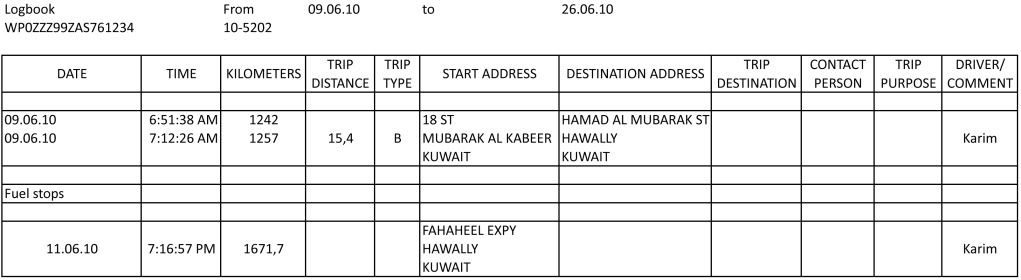
Below is a sample report for your viewing pleasure. I deleted entries from it because they are just additional entries of different trips. I also did some formatting in excel to make it more presentable.
Having had the desire to select all possible upgrade options for the PCM, including voice control, I ticked the box not really knowing what to expect.
Turns out, it is quite useful if you like to keep a record of your trips, etc...
I will not go into all the options and settings unless specifically requested to do so, as these are explained in the PCM user manual.
When you select this option, you receive a Windows CD with the required software to analyze retrieved files on your PC.
The basics are as follows:
The logbook keeps, as the name implies, an electronic log of all your trips with various settings you can make as to the type of trip (Business, Personal, etc...).
It also acts as a reminder for scheduling registration renewals and regulatory emissions testing.
The logbook interfaces with the PCM navigation system such that anytime you are using navigation, it records starting point address and destination automatically.
The logbook also records fuel stops if, when you stop to fuel, you specify that to the logbook.
Finally, the log file can be exported from your PCM to a suitable bluetooth device or to a suitable USB stick inserted in the slot provided under the armrest cover where the iPod sits.
Once you have the file on your PC, using the provided software, you can load it and analyze your trips and filter your data and run certain reports with a limited ability to customize the reports.
You can name your car and you have to provide the plate number. The VIN number is read automatically.
Finally, you can export the data from within the software in excel compatible, semi-colon delimited text format.
Below is a sample report for your viewing pleasure. I deleted entries from it because they are just additional entries of different trips. I also did some formatting in excel to make it more presentable.
Last edited by k_ddsl; Jun 26, 2010 at 02:54 PM. Reason: Spelling
Thread Starter
|
Registered User
Joined: Apr 2010
Posts: 1,153
From: Kuwait
Rep Power: 174
Forgot to mention one cool feature: If you program the two keys you get with your car and assign a driver name to each key, the logbook will automatic identify the correct driver depending on which key was used to open the door.
I think that's pretty !
!
I think that's pretty
!


Thread
Thread Starter
Forum
Replies
Last Post
joseph_number1
Automotive Parts & Accessories For Sale/Wanted
12
Jul 19, 2018 05:45 PM
