


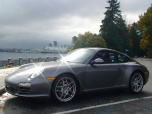
First 911, first post, first pics!


Registered User
Joined: Dec 2008
Posts: 178
From: Raleigh, NC
Rep Power: 25

That's a beauty. Nice photos as well!
Enjoy!
To upload or link to an Avatar:
Click on "User CP" in the nav bar at the top page then look to the nav bar to your left and click on "Edit Avatar"
Enjoy!
To upload or link to an Avatar:
Click on "User CP" in the nav bar at the top page then look to the nav bar to your left and click on "Edit Avatar"

Thread Starter
|
Registered User
Joined: Oct 2009
Posts: 109
From: Canada
Rep Power: 22
Since none of the other 11 posters answered your question then I will-
To load up your profile picture, which I assume you mean your avatar which is the picture that shows up next to your name in each post, you click on 'User CP' in the top right side of the screen, and the on the left side of the screen click on "Edit Avatar"
To load up your profile picture, which I assume you mean your avatar which is the picture that shows up next to your name in each post, you click on 'User CP' in the top right side of the screen, and the on the left side of the screen click on "Edit Avatar"


Thread
Thread Starter
Forum
Replies
Last Post