


Remove Sound Level Compensation Feature?

Thread Starter
|
Registered User
Joined: Jan 2012
Posts: 24
Rep Power: 0

Disable Bose Noise Compensation Feature?
I find the Bose noise compensation feature, which increases and reduces the sound system volume when the car speeds up and slows down, to be very annoying. When I set the volume set at a normal listening level while driving, the sound system reduces the volume to an almost imperceptible level when the car slows down and stops, at a stop sign for instance. I find myself constantly fiddling with the volume controls to maintain the same volume.
Is there a way to disable or disconnect this feature in the settings, or directly on the amp? Here is a picture that shows that the feature is located in the amp, but the settings may exist on the audio menu screen.
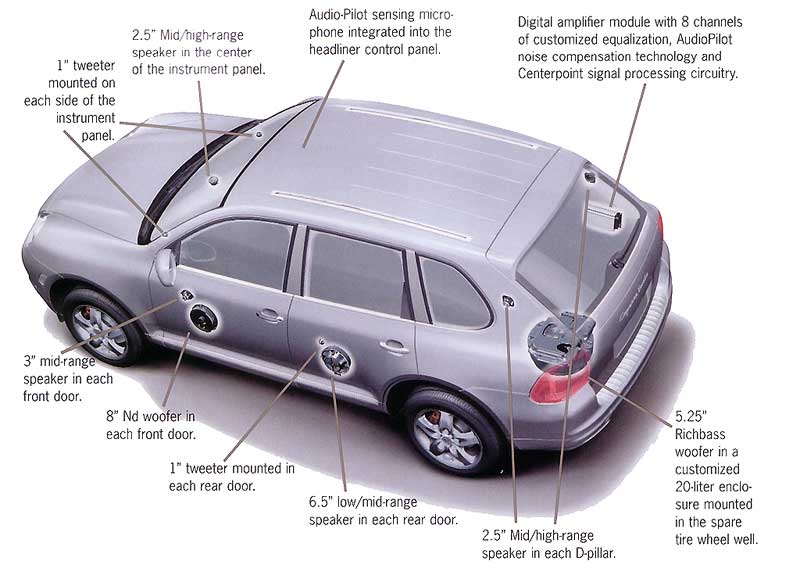
Is there a way to disable or disconnect this feature in the settings, or directly on the amp? Here is a picture that shows that the feature is located in the amp, but the settings may exist on the audio menu screen.
Last edited by silvercayenneS; Feb 6, 2012 at 10:01 AM.

Registered User
Joined: Dec 2003
Posts: 27
From: Bay Area, CA
Rep Power: 24
In the Audio settings section (I think under the 'Sound' button), one of the last options is "AudioPilot" - uncheck this box. I also disabled this when I had the PCM in my car, I found it very annoying and too sensitive.

Thread
Thread Starter
Forum
Replies
Last Post
eclip5e
Automobiles For Sale
6
Jul 29, 2019 11:13 AM
vividracing
991
6
Jun 10, 2017 07:45 PM
vividracing
997
11
Oct 6, 2015 03:43 PM
