
Issue with AUX/Bluetooth input on my GTS
Subscribe

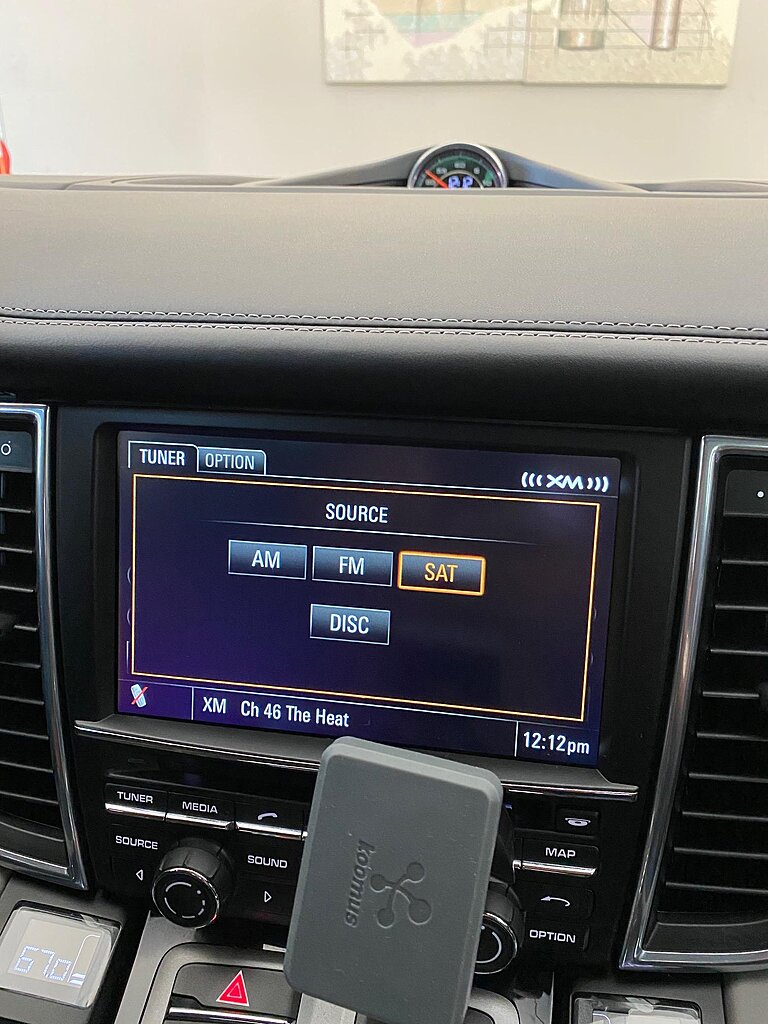
I've done a little searching on the forum but came up short regarding AUX/bluetooth to play music from my phone to the car wirelessly . All the youtube videos I watched show a AUX option on this screen after clicking 'source' but I don't have it. Was that really an option when ordering the car new, or am I doing something wrong here?

Have you already paired your phone via BT? If so, you should already be connected. The sound quality was so poor w/ my BT connection (Burmester stereo option) that I switched over to the AUX input in the center storage bin. Does your car have this USB port? The AUX button on my PCM screen activates it in my car. Not sure why you're not even seeing the AUX option.

This might not work. There's also another way. It took me some google search to find the correct procedure.
Don't give up. It will work. It's great!
So yes, I was able to connect the phone via bluetooth and all its capabilities are functional (outgoing / incoming calls) but nothing happens when I play music. It simply stays connect to the car, but the BT audio just plays from the phones speakers. I have the Bose stereo - maybe the Burmester is too good of quality to take on phone audio lol. I do have the USB port and the AUX port. The music does work fine when manually connected, I was just trying to avoid exposed cords if at all possible.
Quote:
This might not work. There's also another way. It took me some google search to find the correct procedure.
Don't give up. It will work. It's great!
Thanks for the video. That's the same instructions I've seen but my issues starts after I click Source and no AUX option appears, per my original photo.Originally Posted by Nikita4Ever
https://www.youtube.com/watch?v=TG6tIFoxRzwThis might not work. There's also another way. It took me some google search to find the correct procedure.
Don't give up. It will work. It's great!
Damn! I just did this a week ago! Let me find the how-to's.
This is weird but go to the Disc, Options. It might be there.
This is weird but go to the Disc, Options. It might be there.
Quote:
This is weird but go to the Disc, Options. It might be there.
Tried it but no luck Originally Posted by Nikita4Ever
Damn! I just did this a week ago! Let me find the how-to's.This is weird but go to the Disc, Options. It might be there.

V3.4.1 is my current model if that makes any difference.
There's nothing wrong if your PCM. The process is just weird! That's all.  LOL
LOL
If you have the patience, look for any item with Options. It's in one of the options. LOL
LOLIf you have the patience, look for any item with Options. It's in one of the options. LOL

I think older bluetooth does not support music, only phone calls. But hoping for you!!!
Could try deleting phone pairing from both car and phone, and repairing. Then watch carefully for option for music, or the like.
Could try deleting phone pairing from both car and phone, and repairing. Then watch carefully for option for music, or the like.
I have this capability in my 2010, so I don't think it's the age of the vehicle that's the issue.
I'm going to have to record a video and show you guys what I see. Maybe that way we can better troubleshoot because I swear I'm clicking every option possible.
I'm tempted to reset my PCM to replicate your issue.
Press Disc, Option, Set Disc/Aux, Aux Bluetooth
Don't press disc more than once.
If you have to retry, press another button first then press Disc.
Yours is the "Media" button.
Don't press disc more than once.
If you have to retry, press another button first then press Disc.
Yours is the "Media" button.
Quote:
Don't press disc more than once.
If you have to retry, press another button first then press Disc.
Yours is the "Media" button.
Okay..I'll try that later today and report back. ThanksOriginally Posted by Nikita4Ever
Press Disc, Option, Set Disc/Aux, Aux BluetoothDon't press disc more than once.
If you have to retry, press another button first then press Disc.
Yours is the "Media" button.
Quote:
Don't press disc more than once.
If you have to retry, press another button first then press Disc.
Yours is the "Media" button.
IT WORKED!! Ahh, thanks man. Truly thought it was something wrong with my system lol. A couple of things to note though; So I had to insert a CD as pushing “media” does nothing with no disk inside. From there I was able to follow your instructions to a successful BT audio connection. Also, @skiracer13 I experienced rather poor audio sound as well once I got everything synced. However, i played with it a bit more and discovered that the AUX BT has its own audio settings. Once set, the sound definitely improved and left me content with its quality.Originally Posted by Nikita4Ever
Press Disc, Option, Set Disc/Aux, Aux BluetoothDon't press disc more than once.
If you have to retry, press another button first then press Disc.
Yours is the "Media" button.
Thanks again everyone