When you click on links to various merchants on this site and make a purchase, this can result in this site earning a commission. Affiliate programs and affiliations include, but are not limited to, the eBay Partner Network.
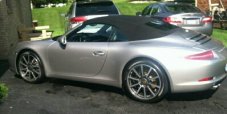
OK folks got my 2014 C4S today. Connected my cell phone no problem, but since the car was previously owned, it has another cell phone on the PCM. my question is how do I remove it. Can't seem to figure it out. driving me crazy. also how do I use voice dialing. thanks. This car is WAY cool.
This setting allows you to display a list of the Bluetooth devices currently authorized for a connection with your PCM.
Displaying authorized Bluetooth devices
Press the button.
Press the button or touch the tab of the same name in the header.
Select "Bluetooth settings"
> "Device list".
The list is opened.
Devices that can be connected to the PCM using different profiles appear a number of times in the list
(e.g. as a cell phone and as a data device).
Connecting an authorized Bluetooth device with the PCM
Data devices cannot be connected from the list of devices; they can only be connected by calling the appropriate application, for example when transferring a vCard.
Open the list of authorized Bluetooth devices.
Select the desired device in the list.
Select "Connect profile".
Disconnecting an authorized and connected Bluetooth device from the PCM
Open the list of authorized Bluetooth devices.
Select the desired device in the list.
Select "Disconnect profile".
Renaming an authorized Bluetooth device
Open the list of authorized Bluetooth devices.
Select the desired device in the list.
Select "Rename device".
The input menu is opened.
Enter the desired name and confirm by selecting "OK".
The name of the device is now changed in the PCM.
Deleting an authorized Bluetooth device from the list
Open the list of authorized Bluetooth devices.
Select the desired device in the list.
Select "Delete".
Confirm the message that appears by selecting "Yes".
Deleting the list of authorized Bluetooth devices
Open the list of authorized Bluetooth devices.
Select any device in the list.
Select "Delete".
Select "Delete list".
Confirm the message that appears by selecting "Delete all".
There is also an option for factory default on all PCM settings.
This will reset everything just like new. So you don't have to deal with any preset options from its prev. life.
Having previous owners name on PCM for phone is how I got a reference on the preowned car I ended up buying. I tracked down the owner from LinkedIn and asked if that was his Porsche and the mechanical soundness of the car etc when I purchased it at 7K miles. The guy was great and told me it was a great car and why he traded it in.
This setting allows you to display a list of the Bluetooth devices currently authorized for a connection with your PCM.
Displaying authorized Bluetooth devices
Press the button.
Press the button or touch the tab of the same name in the header.
Select "Bluetooth settings"
> "Device list".
The list is opened.
Devices that can be connected to the PCM using different profiles appear a number of times in the list
(e.g. as a cell phone and as a data device).
Connecting an authorized Bluetooth device with the PCM
Data devices cannot be connected from the list of devices; they can only be connected by calling the appropriate application, for example when transferring a vCard.
Open the list of authorized Bluetooth devices.
Select the desired device in the list.
Select "Connect profile".
Disconnecting an authorized and connected Bluetooth device from the PCM
Open the list of authorized Bluetooth devices.
Select the desired device in the list.
Select "Disconnect profile".
Renaming an authorized Bluetooth device
Open the list of authorized Bluetooth devices.
Select the desired device in the list.
Select "Rename device".
The input menu is opened.
Enter the desired name and confirm by selecting "OK".
The name of the device is now changed in the PCM.
Deleting an authorized Bluetooth device from the list
Open the list of authorized Bluetooth devices.
Select the desired device in the list.
Select "Delete".
Confirm the message that appears by selecting "Yes".
Deleting the list of authorized Bluetooth devices
Open the list of authorized Bluetooth devices.
Select any device in the list.
Select "Delete".
Select "Delete list".
Confirm the message that appears by selecting "Delete all".
Hey PorscheCrazy - ever heard of this? New (to us) 2014 Cayenne Turbo S. Setup phones via BT and successfully made/received calls and streamed music via BT Aux. Then the next day I hit a few buttons while car was starting up and BT and BT Aux are GONE. I am kind of a geek and have scoured the forums for this to no avail. PCM v4.76. Any options having to do with BT are greyed out. Can't activate BT, phone not available, etc. We reset the PCM and tried every other trick I could find. Any insight?
Thanks for all the great info. We have yanked fuse and tried everything above. Took car to dealer for transfer case warranty replacement (yay!) and had them look at BT issue. See snip of report. This absolutely makes no sense to me. Everything worked and then I pressed some button combo and BT is gone. Nothing else is impacted. Is it a PCM hard drive issue? Some other module? Can anyone help? $3k for new PCM just seems wrong.
Seems to me that if you BT went off as a result of pressing some buttons, you should be able to get it back. A resent, however, should have bought you back to original. I will continue looking for you, but it does sound very weird.
Don't know if you have done this, but you should post on RennList. There is a wider audience there and someone may have had a similar issue and has a solution.
I have posted on Rennlist also. Great response there as well as here.
Bottom line - I cannot wrap my head around this being a hard drive issue. A hard drive has a disruption and JUST BT fries? I don't see it. From other posts, I have learned that BT is built into PCM, not a separate "radio" (using old school terms). I can wrap my head around a hardware failure bcs it is isolated but it really feels like firmware or something else.









 How to delete bluetooth connected phones