


Dension 500S BT install - What am I doing wrong?


Thread Starter
|
Basic Sponsor

Joined: Feb 2009
Posts: 2,286
From: USA
Rep Power: 0


Dension 500S BT install - What am I doing wrong?
I am looking for some help in trying to get my Dension 500S installed correctly in my 997.1 TT. My stereo set up is
This is how I had it set up in the trunk and working fine.
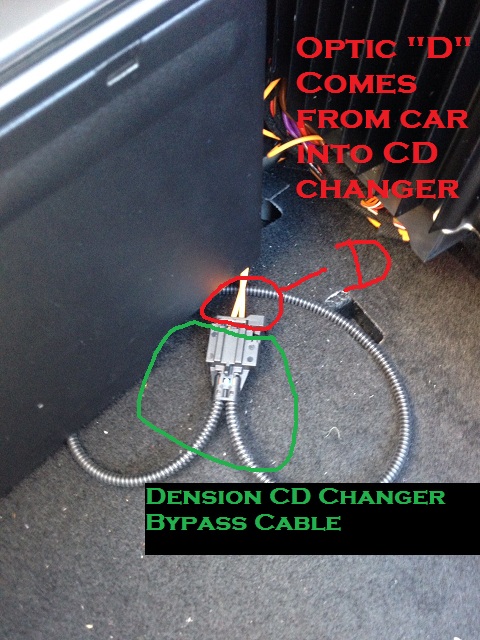
Optic "D" (which came from the car into the CD changer) was plugged into Optic "B" (which was plugged into the "car side" of side of the Dension unit). Note: this pic was taken after I moved the Dension unit behind the PCM so please ignore the CDC bypass cable.
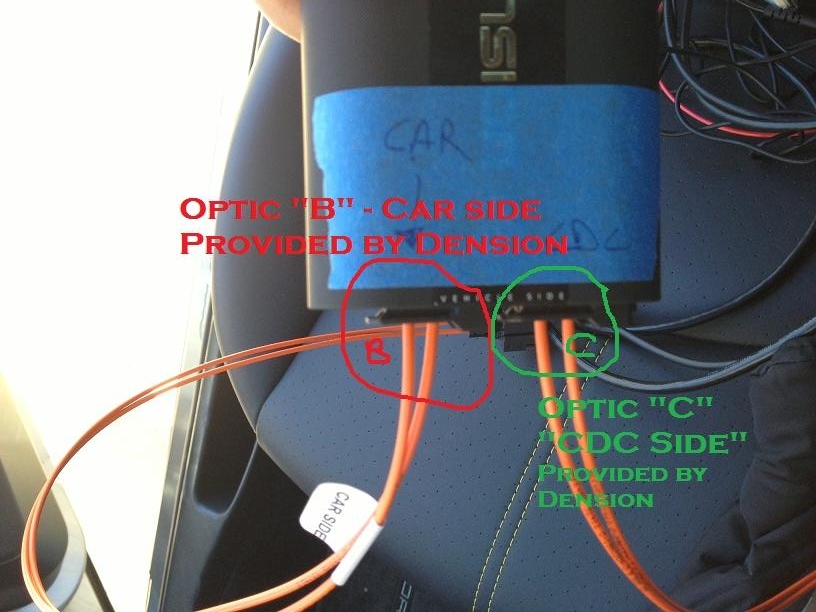
Then "Optic C" was plugged into the actual CD changer in the car.
With that set up, I had it working fine.
Now I am trying to install it behind the PCM and can't get it to work. This is what I did.
I took "Optic A" (which was originally plugged into the PCM)
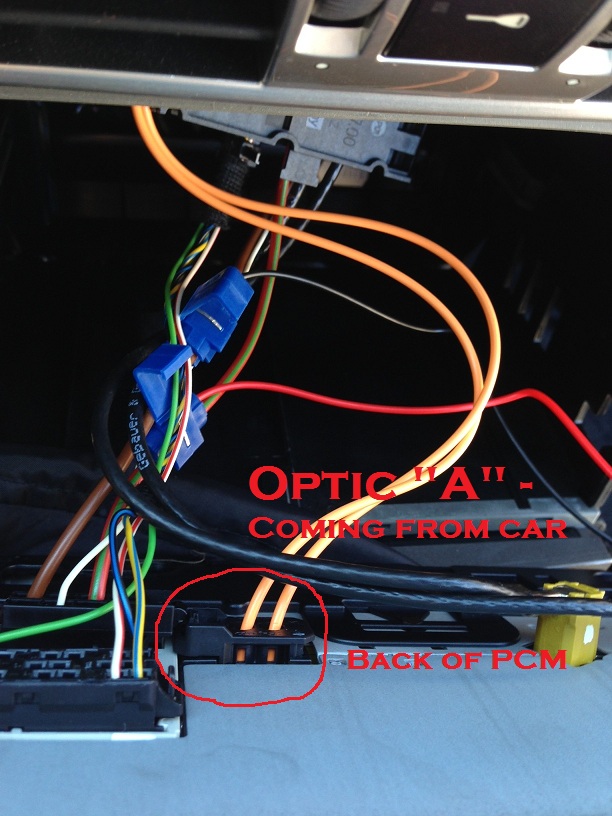
and plugged it into Optic "B" that is connected into the "Car side" port. Then I took Optic "C" from the Dension and connected it to the back of the PCM.
I also connected the Optic "D" (that was coming from the car and originally connected to the CD changer) and plugged it into the Dension Bypass Cable.
I resetted the Dension and when I turned on the car, I received this error message
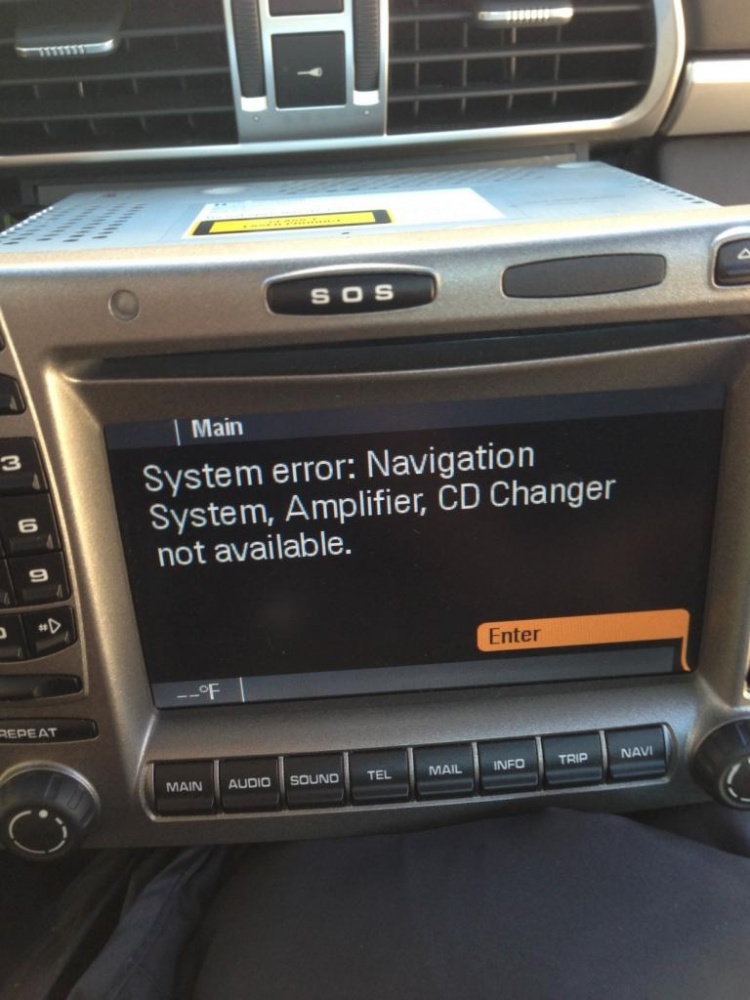
I figured I had the optical cable "B" and "C" in the wrong port of the Dension so when I swapped both of those, I get the error message that say the "Amp and Navigation" not available BUT it DID NOT say CD changer was available like the first error message.
Does anyone know what I'm doing wrong? Any help is appreciated.
Edwin
- Bose
- CD Changer
- No phone
This is how I had it set up in the trunk and working fine.
Optic "D" (which came from the car into the CD changer) was plugged into Optic "B" (which was plugged into the "car side" of side of the Dension unit). Note: this pic was taken after I moved the Dension unit behind the PCM so please ignore the CDC bypass cable.
Then "Optic C" was plugged into the actual CD changer in the car.
With that set up, I had it working fine.
Now I am trying to install it behind the PCM and can't get it to work. This is what I did.
I took "Optic A" (which was originally plugged into the PCM)
and plugged it into Optic "B" that is connected into the "Car side" port. Then I took Optic "C" from the Dension and connected it to the back of the PCM.
I also connected the Optic "D" (that was coming from the car and originally connected to the CD changer) and plugged it into the Dension Bypass Cable.
I resetted the Dension and when I turned on the car, I received this error message
I figured I had the optical cable "B" and "C" in the wrong port of the Dension so when I swapped both of those, I get the error message that say the "Amp and Navigation" not available BUT it DID NOT say CD changer was available like the first error message.
Does anyone know what I'm doing wrong? Any help is appreciated.
Edwin

Former Vendor

Joined: Jul 2003
Posts: 4,034
Rep Power: 0
The key here is that something is not connected in the loop (when that error occurs).
The install behind the PCM is very straightforward (and in our notes).
Take the inbound optical from behind the PCM and place it into the Dension. Take the extra optical from the Dension kit, connect it at the Dension (both in car side port), and then connect it back to the PCM. Make sure all connections are tight.
If no longer have the cdc, make sure the loop is good on both in/out from what was there for the optical, AND remove power to the cdc.
Check all optical connections at PCM, Dension, AMP and loop.
Hit RESET on Dension Aux switch while car is on.
Turn car off, let sit 10 mins.
See if that resolves....email me any details.
The install behind the PCM is very straightforward (and in our notes).
Take the inbound optical from behind the PCM and place it into the Dension. Take the extra optical from the Dension kit, connect it at the Dension (both in car side port), and then connect it back to the PCM. Make sure all connections are tight.
If no longer have the cdc, make sure the loop is good on both in/out from what was there for the optical, AND remove power to the cdc.
Check all optical connections at PCM, Dension, AMP and loop.
Hit RESET on Dension Aux switch while car is on.
Turn car off, let sit 10 mins.
See if that resolves....email me any details.
Thread Starter
|
Basic Sponsor
Joined: Feb 2009
Posts: 2,286
From: USA
Rep Power: 0
The key here is that something is not connected in the loop (when that error occurs).
The install behind the PCM is very straightforward (and in our notes).
Take the inbound optical from behind the PCM and place it into the Dension. Take the extra optical from the Dension kit, connect it at the Dension (both in car side port), and then connect it back to the PCM. Make sure all connections are tight.
If no longer have the cdc, make sure the loop is good on both in/out from what was there for the optical, AND remove power to the cdc.
Check all optical connections at PCM, Dension, AMP and loop.
Hit RESET on Dension Aux switch while car is on.
Turn car off, let sit 10 mins.
See if that resolves....email me any details.
The install behind the PCM is very straightforward (and in our notes).
Take the inbound optical from behind the PCM and place it into the Dension. Take the extra optical from the Dension kit, connect it at the Dension (both in car side port), and then connect it back to the PCM. Make sure all connections are tight.
If no longer have the cdc, make sure the loop is good on both in/out from what was there for the optical, AND remove power to the cdc.
Check all optical connections at PCM, Dension, AMP and loop.
Hit RESET on Dension Aux switch while car is on.
Turn car off, let sit 10 mins.
See if that resolves....email me any details.
Thanks for chiming in. Quick question on removing the power to the CDC. I still have it in the car but the optical cable pulled out and hooked up to the bypass cable. Do I still need to remove the power to the CDC (even if no optical cable is attached)? If so, can I just disconnect the other plug to it or do I have to find the power wire and cut it? Thanks
Edwin
Last edited by PrecisionPorsch; Mar 3, 2013 at 08:43 PM.
Thread Starter
|
Basic Sponsor
Joined: Feb 2009
Posts: 2,286
From: USA
Rep Power: 0
Just an update:
I finally got it working correctly after a few tries. For a non-electrical kind of guy (like me), when the instructions say "inbound" optical, it's not referring to the actual inbound plug ("A")
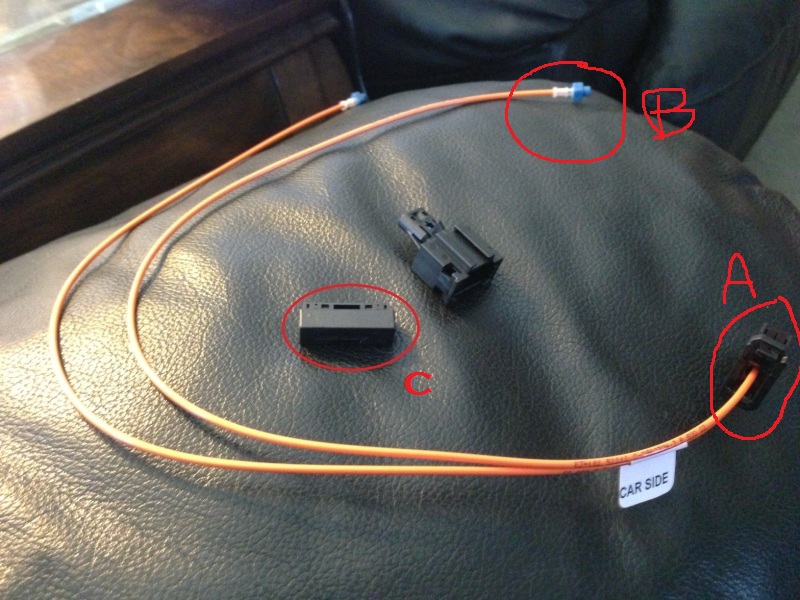
It's referring to the actual inbound optical ("B") which you will have to disconnect off and connect it using the "C" adaptor.
If this was clear to me, I would've saved a lot of time.
Here are my thoughts:
I finally got it working correctly after a few tries. For a non-electrical kind of guy (like me), when the instructions say "inbound" optical, it's not referring to the actual inbound plug ("A")
It's referring to the actual inbound optical ("B") which you will have to disconnect off and connect it using the "C" adaptor.
If this was clear to me, I would've saved a lot of time.
Here are my thoughts:
- Installation: If I had to do it over again, I would install it behind the PCM. Because I have a CD Changer ("CDC") on the bottom left side of the trunk, I inititally thought it would be best to install it in the trunk b/c 1) there would be so much room to work and etc...wrong. 2) The CDC is a @$## to get out b/c there are two bolts that are hard to get at b/c the trunk lining gets in the way. 3) also, once you get everything hooked up, you will have to hide the wires which I also found very difficult b/c the optical cables aren't very easy to move around. 4) You will also need to run all the wires through the firewall to get the BT mic and etc into the cabin. There was no way those would reach IMO. 5) Finally, I was receiving very spotty reception with the dension unit in the trunk. When I mean spotty, it seemed like every 3-5 minutes I would get static. Unacceptable to me. I finally resorted to buying the CDC bypass cable and installing it behind the PCM and it seemed to improve the reception quite a bit. Overall, if I know what I knew now (after trial and error), I can install this unit in under an hour from start to finish. I just wish both Dension's and Eric's instructions was a little clearer for the "non-electrical" guys like me.
- Price: after buying the unit and the CDC bypass cable, I think I spent around $600 all in. My other options were to get a new double din aftermarket HU but I really didnt' want to mess with all that. Also the price would've been about 2.5x more.
- User Interface: Definitely not the best UI and easiest to use. It does take some getting used to but it's acceptable.
- Summary: If you just want BT streaming capability and phone, this is a good unit for the price. The unit will still be glitch and will need to be reset from time to time (at least in my experience) but if you installed the unit behind the PCM and have teh reset box in the glove box, it's a easy fix. IF you decide to get the DENSION, BUY FROM ERIC. He was very responsive to all my emails (weekdays and weekends). I can only imagine how bad the post-sales install help would be had I went online to save a few bucks.
Last edited by PrecisionPorsch; Mar 15, 2013 at 08:38 AM.

Registered User
Joined: Jul 2012
Posts: 775
From: Stockholm, Sweden
Rep Power: 72
I bought mine directly from Dension since I am in EU, so the price diff was quite big (eu-tax, customs fee and shipping). But I have had issues like in the op and received basically no support from Dension at all, only got one email response in 4months and it was a dead end stupid question. The only help I got is from reading threads online where Eric and others chime in.
I think the issue I have has been the "need to reset" since I did this 2 weeks ago it has been working everyday, but I really dont trust the unit, I am hoping for a new FW to improve reliability (v48).
Former Vendor
Joined: Jul 2003
Posts: 4,034
Rep Power: 0
New firmware has been in beta for a couple weeks, due out soon, watch for posts or email me if needed. This should resolve any of the lingering issues, as Dension had both a 911 and Cayenne in house for testing for a couple of weeks, and though they could not replicate every little issue that we heard about (not a high percentage of units, but enough to make folks frustrated).....this should iron it all out.
Watch for it soon. We've put it on a few units thus far that had bluetooth drop/reconnect issues, and one other issue, and it seems to have resolved.
Watch for it soon. We've put it on a few units thus far that had bluetooth drop/reconnect issues, and one other issue, and it seems to have resolved.

Thread
Thread Starter
Forum
Replies
Last Post
