


AppRadio 2 review


Thread Starter
|
Registered User
Joined: Mar 2011
Posts: 315
From: Alpharetta, GA
Rep Power: 32

AppRadio 2 review
SPH-DA100. I had it installed about 2 weeks ago and wanted to spend some time with it before passing judgement (I like it more now than when it first went in)
The original AppRadio appeared to be 'not ready for prime time' (I had not used it).
AppRadio2 now supports iPhone5 (will also work - maybe better - with Android and iPhone4). As I wanted to refresh my headunit, thought it was worth a try. My main goal was to get access to an ipod or iphone music and Navigation. I do not drive alot, so a very robust Nav solution was not needed.
All in, the setup and install cost me $670. (I really was not looking for the cheapest solution - I liked the concept of utilizing existing functions on my iPhone)
I had expected to be able to use native iPhone5 apps such as Maps, music, browsing - what I got was a bit different.
Pioneer has a number of applications written for the AppRadio 2 interface - you have to use these apps for best results. There are not a whole lot of apps yet, but I would expect the number to grow over time.
See their web site for details.
You have to open the apps you will use on the iPhone5 before you can use them on the headunit. Therefore, things like AppRadio, CarMediaPlayer, Pandora, NAVFree, Mixtrax are running on my iPhone when I connect it.
I also had the parking brake bypass installed, so I can access apps without the parking brake on.
You need to establish a Bluetooth connection between your phone and the headunit.
The good:
- Nice touch screen, simple controls, looks good
- Native radio works as expected, if you do not connect your phone - this is all you can access.
- The apps specifically written for AppRadio 2 work well. A couple of glitchy things - but nothing major.
- I can listen to music and run my NAV, the music will fade out/in when I get NAV prompts. Same with the phone, the music goes on mute when I place/receive a call.
- The phone charges while plugged in
- Can view photos, video on your iPhone (I don't see the use though)
The not so good:
- I cannot use the native iPhone5 maps program. No voice prompts, no way to plug in a destination. therefore, I am using the NavFree app written for AppRadio 2. So far, it is fine. I can also purchase a full version of Nav software for AppRadio 2 if I need more funtionality.
- The cabling needs help. There are 2 big cables/leads (USB and Digital AV) that are plugged into the adapter that provides the Lightning connection to your iPhone. This means you have a ton of cables in plain view. I ended up pulling all of this behind the headunit and I plugin my iphone in the passengers footwell. Problem is that sometimes I have to go back to my iPhone 5 screen to clear a message - difficult to get to. The solution would be a @2' Lightning extension (male on one end, female on the other) that I could route thru the back of the storage tray under the headunit and store my iPhone nearly, with some slack to pull it out while still connected. They do not yet make this cable.
- iPhone5 notifications popup once in awhile and can only be cleared from the iPhone itself.
Bottom line:
While it still needs some maturity, I am very happy with it. However I expect it to improve over the next year - more apps, lightning extension cable from Apple, more native iPhone5 functionality.
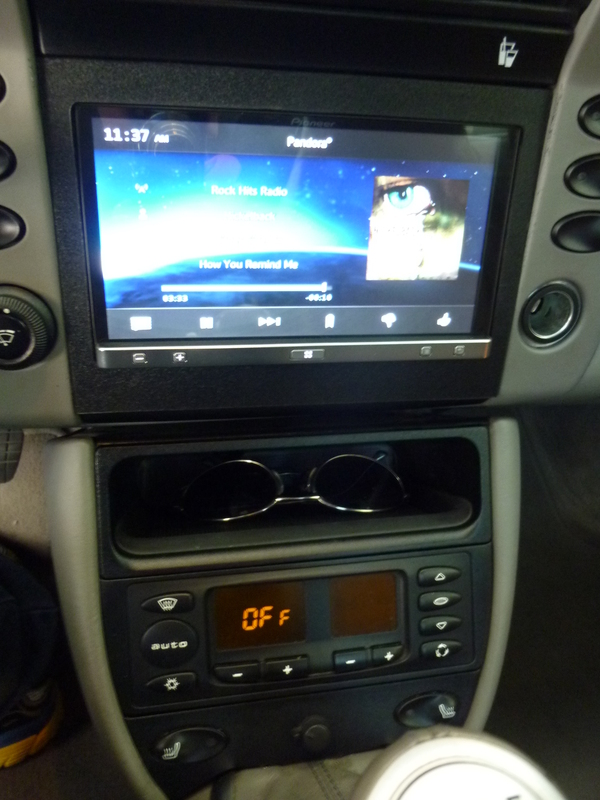
Center stack. AC moved to bottom. Shelf under the double DIN. I want to keep my iPhone here, but as you will see later - the current cabling makes this difficult.
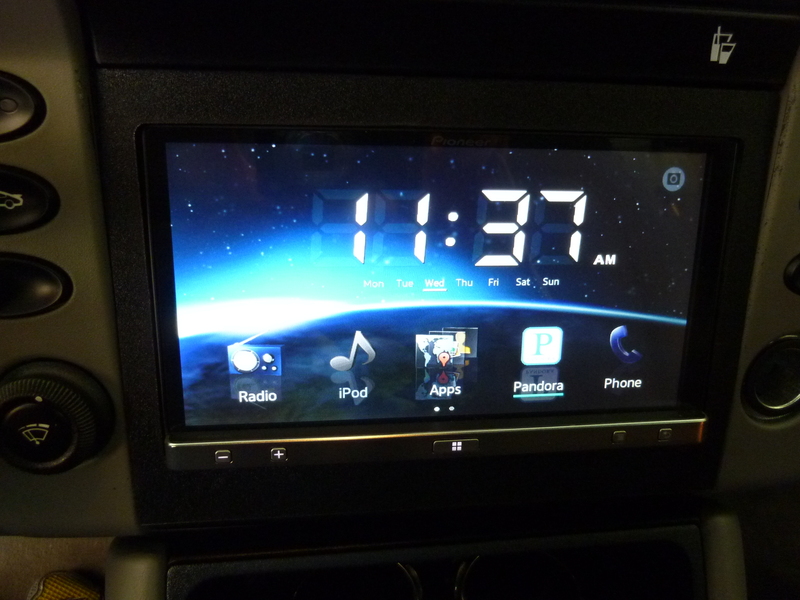
Main Screen upon startup (you have to have Pandora running on your phone if you want to use Pandora from the headunit)
If you launch pandora (normally get album art, title, artist, etc...picture was taken between songs)

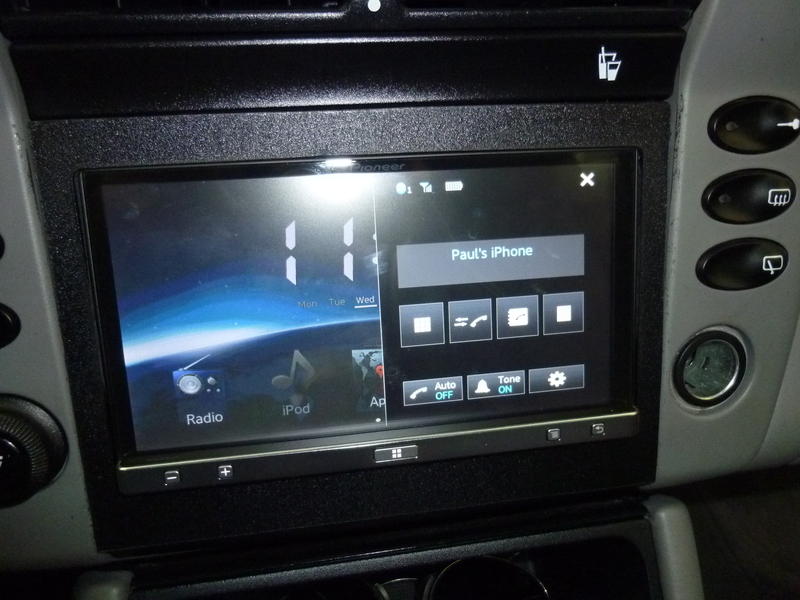
If you launch your phone. Full access to your iPhones contact list. Volume control, mute, any music playing auto mutes.
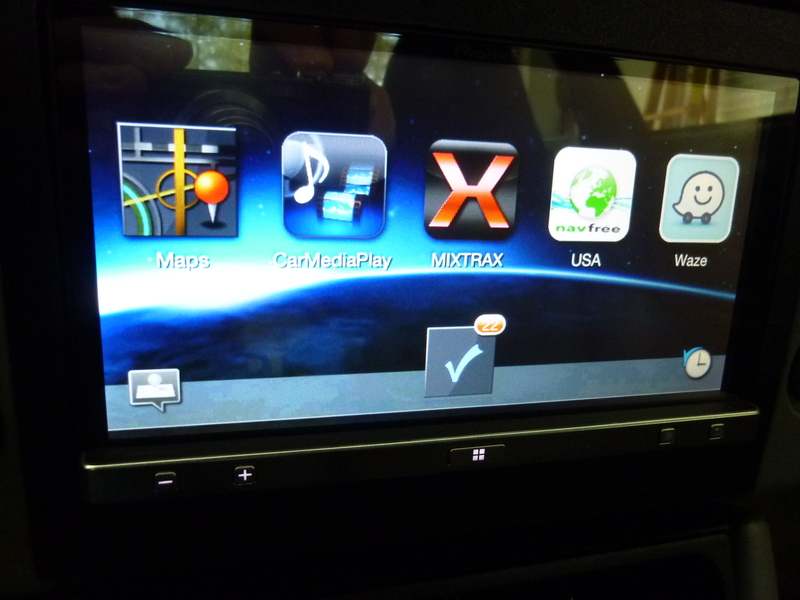
If you click on Apps, you get to a subscreen. Any apps here have to be installed and running on your iphone5. It will also pull todays calendar if you click on the check box.
If you want to play off of the playlists / songs on your iPhone, click on CarMediaPlay. You get a notification screen as it connects to your iPhone. This was buggy at first as it didn't always connect, however I think it might be related to the parking brake bypass. When I started getting into it with the parking brake off - it worked fine everytime. It got confused when I accessed with the parking brake on.

Then you get another screen (mirrors what is on your iPhone) - you have to click "Allow" on your iPhone in order to continue (not sure if there is a way to auto accept all the time as you have to clear it on the phone)
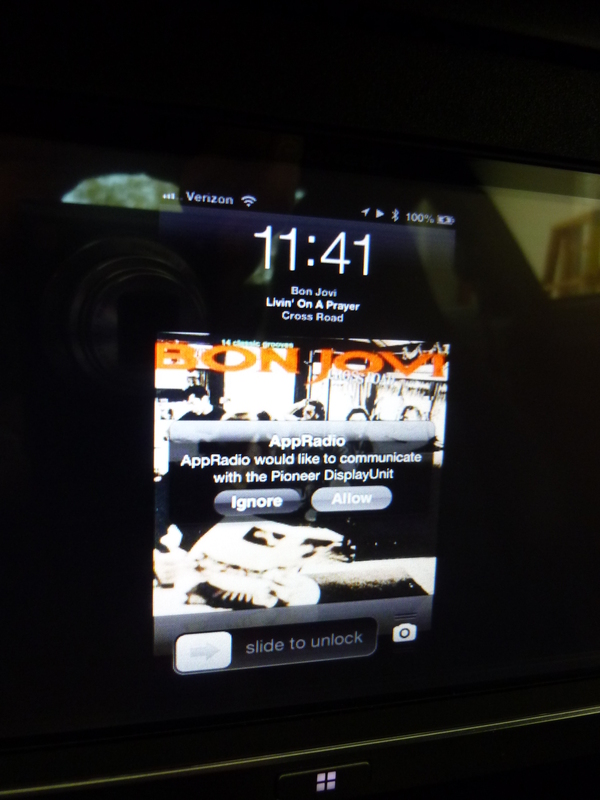
When you do press Allow, you will be playing off of your iPhone playlist
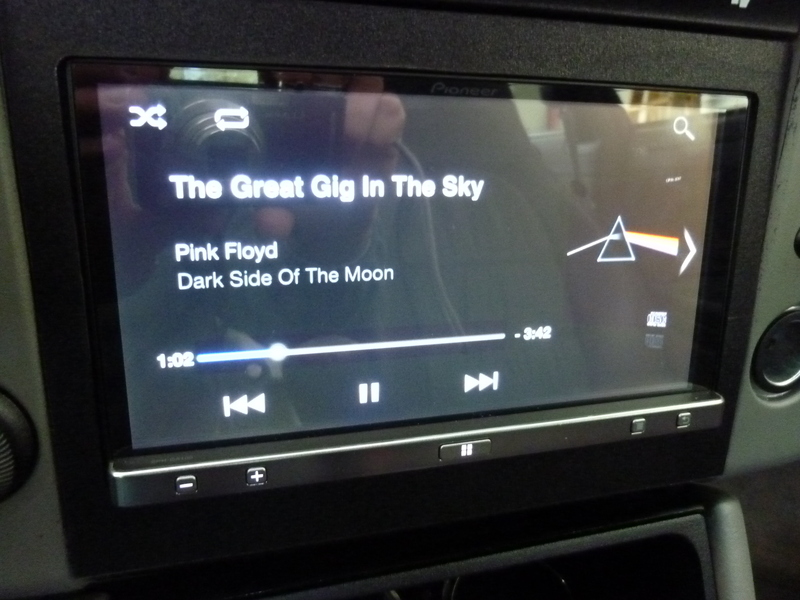
Additional functions like search, playlist, song, artist, etc are available

If I go back to the subscreen, I can go into any loaded apps such as NavFreeUSA

Drilling down
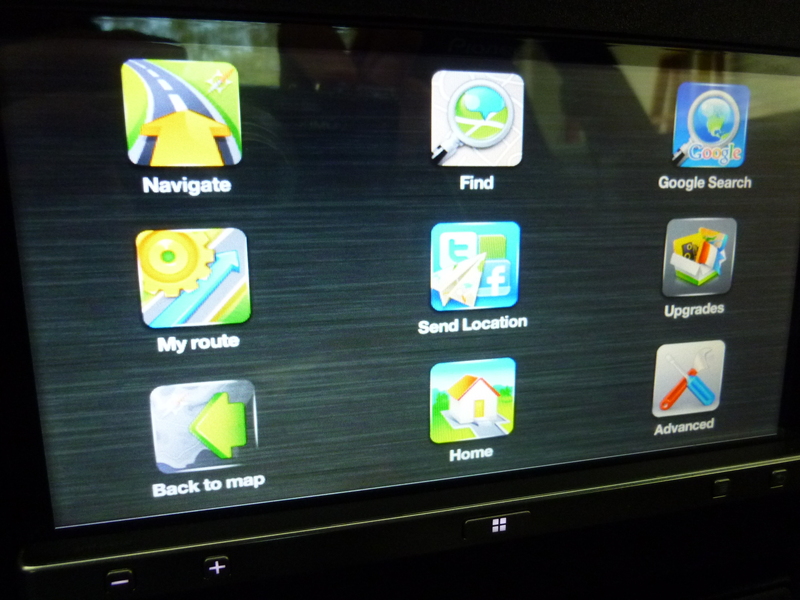
Eventually to
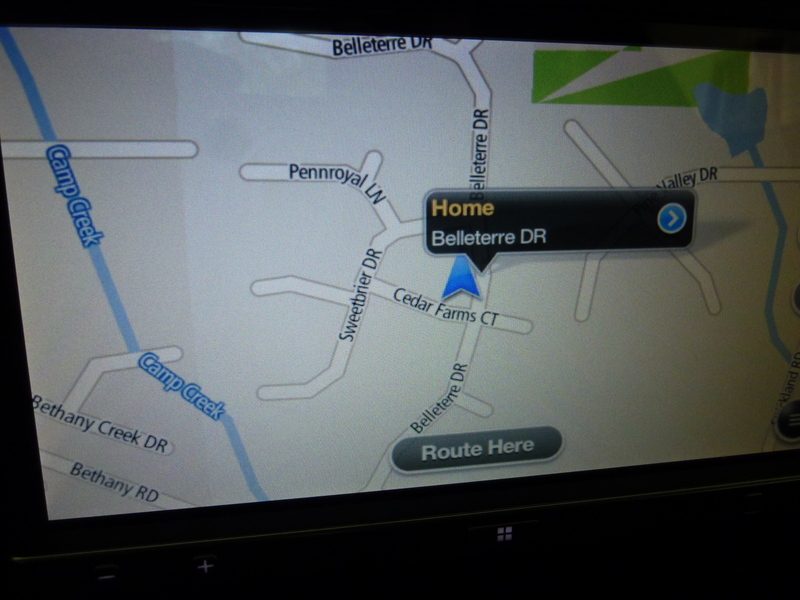
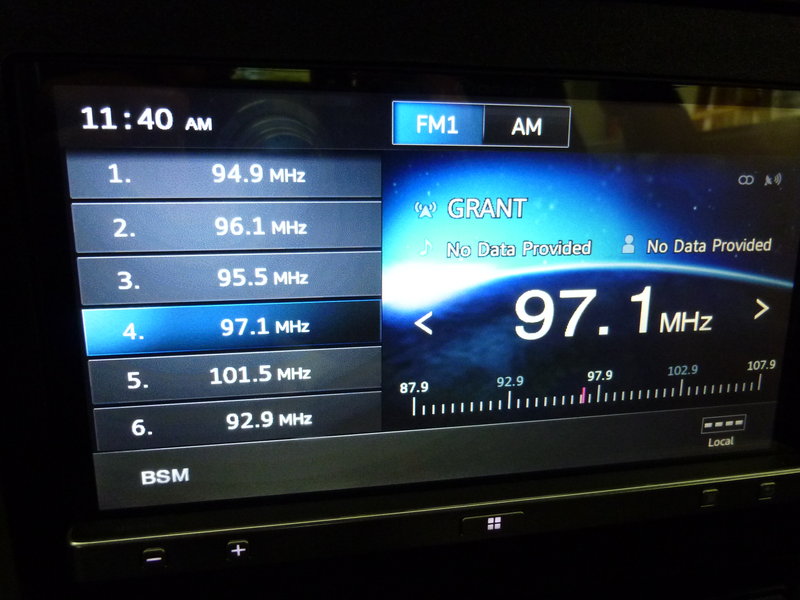
Radio works as expected
Here is how the cabling is setup. I had all the cables shoved into the shelf under the headunit, too cluttered, so I pulled it back. What is needed is a lightning extension cable - which they do not yet make, to extend the Lightning pigtail. this would allow only a small unobtrusive cable to enter into the shelf. Then I could have easier access to the iPhone an no clutter.

The original AppRadio appeared to be 'not ready for prime time' (I had not used it).
AppRadio2 now supports iPhone5 (will also work - maybe better - with Android and iPhone4). As I wanted to refresh my headunit, thought it was worth a try. My main goal was to get access to an ipod or iphone music and Navigation. I do not drive alot, so a very robust Nav solution was not needed.
All in, the setup and install cost me $670. (I really was not looking for the cheapest solution - I liked the concept of utilizing existing functions on my iPhone)
I had expected to be able to use native iPhone5 apps such as Maps, music, browsing - what I got was a bit different.
Pioneer has a number of applications written for the AppRadio 2 interface - you have to use these apps for best results. There are not a whole lot of apps yet, but I would expect the number to grow over time.
See their web site for details.
You have to open the apps you will use on the iPhone5 before you can use them on the headunit. Therefore, things like AppRadio, CarMediaPlayer, Pandora, NAVFree, Mixtrax are running on my iPhone when I connect it.
I also had the parking brake bypass installed, so I can access apps without the parking brake on.
You need to establish a Bluetooth connection between your phone and the headunit.
The good:
- Nice touch screen, simple controls, looks good
- Native radio works as expected, if you do not connect your phone - this is all you can access.
- The apps specifically written for AppRadio 2 work well. A couple of glitchy things - but nothing major.
- I can listen to music and run my NAV, the music will fade out/in when I get NAV prompts. Same with the phone, the music goes on mute when I place/receive a call.
- The phone charges while plugged in
- Can view photos, video on your iPhone (I don't see the use though)
The not so good:
- I cannot use the native iPhone5 maps program. No voice prompts, no way to plug in a destination. therefore, I am using the NavFree app written for AppRadio 2. So far, it is fine. I can also purchase a full version of Nav software for AppRadio 2 if I need more funtionality.
- The cabling needs help. There are 2 big cables/leads (USB and Digital AV) that are plugged into the adapter that provides the Lightning connection to your iPhone. This means you have a ton of cables in plain view. I ended up pulling all of this behind the headunit and I plugin my iphone in the passengers footwell. Problem is that sometimes I have to go back to my iPhone 5 screen to clear a message - difficult to get to. The solution would be a @2' Lightning extension (male on one end, female on the other) that I could route thru the back of the storage tray under the headunit and store my iPhone nearly, with some slack to pull it out while still connected. They do not yet make this cable.
- iPhone5 notifications popup once in awhile and can only be cleared from the iPhone itself.
Bottom line:
While it still needs some maturity, I am very happy with it. However I expect it to improve over the next year - more apps, lightning extension cable from Apple, more native iPhone5 functionality.
Center stack. AC moved to bottom. Shelf under the double DIN. I want to keep my iPhone here, but as you will see later - the current cabling makes this difficult.
Main Screen upon startup (you have to have Pandora running on your phone if you want to use Pandora from the headunit)
If you launch pandora (normally get album art, title, artist, etc...picture was taken between songs)
If you launch your phone. Full access to your iPhones contact list. Volume control, mute, any music playing auto mutes.
If you click on Apps, you get to a subscreen. Any apps here have to be installed and running on your iphone5. It will also pull todays calendar if you click on the check box.
If you want to play off of the playlists / songs on your iPhone, click on CarMediaPlay. You get a notification screen as it connects to your iPhone. This was buggy at first as it didn't always connect, however I think it might be related to the parking brake bypass. When I started getting into it with the parking brake off - it worked fine everytime. It got confused when I accessed with the parking brake on.
Then you get another screen (mirrors what is on your iPhone) - you have to click "Allow" on your iPhone in order to continue (not sure if there is a way to auto accept all the time as you have to clear it on the phone)
When you do press Allow, you will be playing off of your iPhone playlist
Additional functions like search, playlist, song, artist, etc are available
If I go back to the subscreen, I can go into any loaded apps such as NavFreeUSA
Drilling down
Eventually to
Radio works as expected
Here is how the cabling is setup. I had all the cables shoved into the shelf under the headunit, too cluttered, so I pulled it back. What is needed is a lightning extension cable - which they do not yet make, to extend the Lightning pigtail. this would allow only a small unobtrusive cable to enter into the shelf. Then I could have easier access to the iPhone an no clutter.

Registered User
Joined: Aug 2011
Posts: 436
From: AZ
Rep Power: 42

Is it pretty responsive when navigating through menus? I remember seeing a few demo videos where it looked a little sluggish, ie when you hit a button, there is a delay before it opens the next screen.
I hope they come out with a more polished appradio 3 soon. Its such a great concept for those of us who don't need all the bells and whistles of a full on Navigation/audio system.
I hope they come out with a more polished appradio 3 soon. Its such a great concept for those of us who don't need all the bells and whistles of a full on Navigation/audio system.
Registered User

Joined: Jul 2012
Posts: 644
From: Sarasota, FL
Rep Power: 71
Very nice writeup! I was considering this unit and after reading your post I am more inclined to give it a try. I am sorry to read that it does not work with the native maps app on the phone. How about using the mapquest app? Will that work?
Thanks for taking the time to post this.
Thanks for taking the time to post this.
Thread Starter
|
Registered User
Joined: Mar 2011
Posts: 315
From: Alpharetta, GA
Rep Power: 32
Dashcommand = YES. I saw some mediocre reviews, but it looks promising. I saw that Harrys Lap Timer was not going to make his app for the AppRadio, so Dash Command it is! What's your take on DashCommand?
It is responsive enough going thru the menus - not lightning fast, but not so bad that it is noticeable. The biggest gap is when you click on the Apps | CarMedia Play sequence as it has to communicate. Once in - it is fine.
It is responsive enough going thru the menus - not lightning fast, but not so bad that it is noticeable. The biggest gap is when you click on the Apps | CarMedia Play sequence as it has to communicate. Once in - it is fine.
Registered User
Joined: Jun 2010
Posts: 544
From: SA, TX
Rep Power: 49
i think the dashcommand would be great to monitor different parameters but I'm curious if there is any lag/delay. I'll wait to hear your review....lol
Trending Topics
Thread Starter
|
Registered User
Joined: Mar 2011
Posts: 315
From: Alpharetta, GA
Rep Power: 32
Here is a quick video I just made - navigating thru some of the options...radio, iphone playlist, Nav, I Heart Radio. That should help you see real time how it reacts when navigating thru the menus.
(They actually just pushed another update today, made some improvements...I think that is a benefit to this system, as long as it gets attention - it will continue to improve and more apps will come out).
(They actually just pushed another update today, made some improvements...I think that is a benefit to this system, as long as it gets attention - it will continue to improve and more apps will come out).

Registered User
Joined: Dec 2012
Posts: 346
From: Portsmouth, NH
Rep Power: 36
Excellent write-up! Well done sir! Couple questions for you...
1. I see that the head-unit runs for about $400 online. Can you provide a breakdown of other associated costs?
2. Where did you find the parking brake bypass?
3. What is the point of bluetooth functionality if you need the cables you listed? Is it just for making/receiving phone calls?
Again, thank you for taking the time to write such a detailed review.
SB
1. I see that the head-unit runs for about $400 online. Can you provide a breakdown of other associated costs?
2. Where did you find the parking brake bypass?
3. What is the point of bluetooth functionality if you need the cables you listed? Is it just for making/receiving phone calls?
Again, thank you for taking the time to write such a detailed review.
SB
Thread Starter
|
Registered User
Joined: Mar 2011
Posts: 315
From: Alpharetta, GA
Rep Power: 32
1. Pioneer has a $120 rebate right now SPH-DA100. Amazon = $331 - $120 rebate.
- Pioneer Cable Kit - CD-IH202 = $60 Amazon (not sure if my installer ended up using this or not - I don't see any cables missing?? but Pioneer says you need this for iPhone5 setup?)
- Apple Lightning to Digital AV connector = $50 Amazon
- Apple Lightning to USB cable = $20 Amazon
- Parking brake Micro Bypass Chip = $25 Amazon (search for it)
- Custom Bezel for around the headunit = $70 made by my shop
- HVAC bezel if moving AC to lower section = 9965523390001C, $10 Dealer
- Square storage shelf = 9965522530101C, $50 Bumperplugs
- Install = $170
Not sure all that Bluetooth controls - assume it is for making and receiving calls.
Since my review, there has been another AppRadio update and a few new apps. Honestly it is not bulletproof yet - still a bit spotty. Sometimes it connects and works perfect - other times I cannot get into some functions and have to disconnect, restart. My hope is that it will continue to improve. The phone functions and radio work the best. Pandora work very good - sometimes it did not startup for some reason. It is more problematic getting into the Apps portion. Once it makes its connection, it is typically good from then on - but sometimes startup is spotty.
- Pioneer Cable Kit - CD-IH202 = $60 Amazon (not sure if my installer ended up using this or not - I don't see any cables missing?? but Pioneer says you need this for iPhone5 setup?)
- Apple Lightning to Digital AV connector = $50 Amazon
- Apple Lightning to USB cable = $20 Amazon
- Parking brake Micro Bypass Chip = $25 Amazon (search for it)
- Custom Bezel for around the headunit = $70 made by my shop
- HVAC bezel if moving AC to lower section = 9965523390001C, $10 Dealer
- Square storage shelf = 9965522530101C, $50 Bumperplugs
- Install = $170
Not sure all that Bluetooth controls - assume it is for making and receiving calls.
Since my review, there has been another AppRadio update and a few new apps. Honestly it is not bulletproof yet - still a bit spotty. Sometimes it connects and works perfect - other times I cannot get into some functions and have to disconnect, restart. My hope is that it will continue to improve. The phone functions and radio work the best. Pandora work very good - sometimes it did not startup for some reason. It is more problematic getting into the Apps portion. Once it makes its connection, it is typically good from then on - but sometimes startup is spotty.
Excellent write-up! Well done sir! Couple questions for you...
1. I see that the head-unit runs for about $400 online. Can you provide a breakdown of other associated costs?
2. Where did you find the parking brake bypass?
3. What is the point of bluetooth functionality if you need the cables you listed? Is it just for making/receiving phone calls?
Again, thank you for taking the time to write such a detailed review.
SB
1. I see that the head-unit runs for about $400 online. Can you provide a breakdown of other associated costs?
2. Where did you find the parking brake bypass?
3. What is the point of bluetooth functionality if you need the cables you listed? Is it just for making/receiving phone calls?
Again, thank you for taking the time to write such a detailed review.
SB

Registered User
Joined: Mar 2013
Posts: 140
Rep Power: 19
Hello,
Just bought an 03 C4S and considering the appradio. Thanks for your review and photos, very helpful. One question:
How seamless is the bluetooth connection to the iphone5? As in, when I get in the car, does the phone automatically connect to the appradio and allow me to receive and make calls from the head unit? Or do I have to manually "connect" the phone each time I get in?
If my main goal was flawless bluetooth connectivity, is there a better head unit suited to my application? I have a Sony BT-400 and external mic wired in my 4Runner and very happy with it. Thanks a lot!
Just bought an 03 C4S and considering the appradio. Thanks for your review and photos, very helpful. One question:
How seamless is the bluetooth connection to the iphone5? As in, when I get in the car, does the phone automatically connect to the appradio and allow me to receive and make calls from the head unit? Or do I have to manually "connect" the phone each time I get in?
If my main goal was flawless bluetooth connectivity, is there a better head unit suited to my application? I have a Sony BT-400 and external mic wired in my 4Runner and very happy with it. Thanks a lot!
Thread Starter
|
Registered User
Joined: Mar 2011
Posts: 315
From: Alpharetta, GA
Rep Power: 32
(re:an iPhone 5) You have to physically plugin the phone to your Lightning cable each time you get in the car, otherwise things like Pandora / Apps / Phone are greyed out.
It then automatically connects to Bluetooth.
I will still say that the AppRadio2 + iPhone5 connectivity is spotty. Once it works, it is quite good - however, sometimes the connection to the phone does not happen properly. I may need to kill the AppRadio app from my phone and restart it - or unplug, replug. Not things you want to do while driving. I typically get connected after starting my car, at idle and do not take off until I know I got good connections to what I need.
If you want flawless - this is not it (yet)
It then automatically connects to Bluetooth.
I will still say that the AppRadio2 + iPhone5 connectivity is spotty. Once it works, it is quite good - however, sometimes the connection to the phone does not happen properly. I may need to kill the AppRadio app from my phone and restart it - or unplug, replug. Not things you want to do while driving. I typically get connected after starting my car, at idle and do not take off until I know I got good connections to what I need.
If you want flawless - this is not it (yet)
Registered User
Joined: Mar 2013
Posts: 140
Rep Power: 19
(re:an iPhone 5) You have to physically plugin the phone to your Lightning cable each time you get in the car, otherwise things like Pandora / Apps / Phone are greyed out.
It then automatically connects to Bluetooth.
I will still say that the AppRadio2 + iPhone5 connectivity is spotty. Once it works, it is quite good - however, sometimes the connection to the phone does not happen properly. I may need to kill the AppRadio app from my phone and restart it - or unplug, replug. Not things you want to do while driving. I typically get connected after starting my car, at idle and do not take off until I know I got good connections to what I need.
If you want flawless - this is not it (yet)
It then automatically connects to Bluetooth.
I will still say that the AppRadio2 + iPhone5 connectivity is spotty. Once it works, it is quite good - however, sometimes the connection to the phone does not happen properly. I may need to kill the AppRadio app from my phone and restart it - or unplug, replug. Not things you want to do while driving. I typically get connected after starting my car, at idle and do not take off until I know I got good connections to what I need.
If you want flawless - this is not it (yet)
What does it take to just swap out the head unit to an aftermarket item? The build date on my car is 3/03, will the stock wiring/brain just accept another head unit with the appropriate harness?

Registered User

Joined: May 2009
Posts: 850
From: Northeast
Rep Power: 66
I just bought the pioneer app radio SPH-DA02, Will the part numbers listed above work with this radio as well? My feeling is they will. What is different between the two part numbers Where in the Boston MA area installs these things?
Thread Starter
|
Registered User
Joined: Mar 2011
Posts: 315
From: Alpharetta, GA
Rep Power: 32
Minor adjustments made to my setup. Ended up ditching the idea of storing my phone in the shelf. The cable entering the shelf and the phone was too much. Ended up getting an external phone mount (Pro Clip) and a Lightning extension cable (so the mass of cables/connections could remain hidden). This setup, while taking a bit more room than I'd like, is better. Shelf is now open for glasses, wallet storage. Phone is accessible in case I need to access anything from the phone screen. The ProClip is a very good quality mount. One cable (Lightning) available once I mount the phone.
The AppRadio is still tempermental at times - sometimes an app won't start - have to kill it and restart from the phone. But not so bad. Should improve over time thru updates.

The AppRadio is still tempermental at times - sometimes an app won't start - have to kill it and restart from the phone. But not so bad. Should improve over time thru updates.

Thread
Thread Starter
Forum
Replies
Last Post
pasd181
991 Turbo
12
Oct 6, 2015 04:11 AM
