


Head Unit - Nav - Stereo - Double Din - Flip up


Thread Starter
|
Registered User
Joined: Mar 2007
Posts: 162
From: York, PA
Rep Power: 26

Head Unit - Nav - Stereo - Double Din - Flip up
Ive seen a few pics and reviews but cant find them now. Can anyone post pics and reviews of their headunits theyve put in? I think I want Nav, DVD, IPOD, Sirius, and touch screen to be fixed into the dash (double din size).
Has anyone kept the stock amp or is it worth redo-ing everything speakers amp and all?
Thanks.
Has anyone kept the stock amp or is it worth redo-ing everything speakers amp and all?
Thanks.

Registered User
Joined: Mar 2006
Posts: 657
From: Palm Beach, Fl
Rep Power: 47
Originally Posted by tshack
Ive seen a few pics and reviews but cant find them now. Can anyone post pics and reviews of their headunits theyve put in? I think I want Nav, DVD, IPOD, Sirius, and touch screen to be fixed into the dash (double din size).
Has anyone kept the stock amp or is it worth redo-ing everything speakers amp and all?
Thanks.
Has anyone kept the stock amp or is it worth redo-ing everything speakers amp and all?
Thanks.


I am using stock amp with JL Components and an 8in sub...Sounds solid and less than 5lbs added weight...
-Keith

Registered User
Joined: Jun 2004
Posts: 3,187
From: Newport Beach, Ca.
Rep Power: 150
Heres mine....Kenwood DDX7015, the 7019 is the current model....Its got the best Nav out there, made by Garmin and stored on Flash RAM, NOT DVD, so it lightning fast, and upgraded by sD card, no getting new Nav disks, or waiting fo loading....the 7019 has the best iPod interface out there, and Sirius/XM is easy to add...it also can do the XM traffic where it can route you to the fasted way via realtime traffic updates....kinda cool....plays MP3's, DVD's, etc...I love mine....and it looks very factory...in fact everyone thinks its a factory setup until I tell them I installed it.....



Registered User
Joined: Mar 2006
Posts: 657
From: Palm Beach, Fl
Rep Power: 47
I just bought the whole upper console system on ebay...Included the horseshoe, cupholder, bracket, and AC control which I didnt need...
The only modification that you really have to do is cut back on the AC Vent. You can tell from my other thread what I am talking about...See it and ask me any questions there or in PM...
https://www.6speedonline.com/forums/showthread.php?t=84023
-Keith
The only modification that you really have to do is cut back on the AC Vent. You can tell from my other thread what I am talking about...See it and ask me any questions there or in PM...
https://www.6speedonline.com/forums/showthread.php?t=84023
-Keith
I have an Alpine IVA-C801, flip up.
Not as clean as a double-din install, but not many double-din units were around in 2003 when I picked it up, plus I already had the Alpine Changer & DSP unit.

Not as clean as a double-din install, but not many double-din units were around in 2003 when I picked it up, plus I already had the Alpine Changer & DSP unit.
Trending Topics

Registered User
Joined: Apr 2007
Posts: 3,123
From: Chained to my Laptop....
Rep Power: 172

I will be installing a Kenwood DNX 7100 double-din NAV / DVD unit this weekend, will post pics.
The 7100 is similar to the 7015 and 7019- but IIRC it is the newest model and has the GPS built into the main unit + 2gb flash ram so no external GPS box is needed. It SAYS you can use customizeable backgrounds but we'll see what the extent of that really is-
http://buyeretail.com/product.asp?i=KENDNX7100 ($1k approx)
http://www.crutchfield.com/S-A9Q05pv...p?I=113dnx7100 (description)
$985 on amazon! http://www.amazon.com/gp/offer-listi...Q&linkCode=asm
From the reading up I've done prior to buying a unit, the 7xxx series Kenwoods seem to be superior since the NAV DVD can be removed / runs from RAM, and it is easy to bypass the video lockout function for playing DVD's while driving.
IMO, since you have a double-din opening avaialble to you, make full use of it and go with a 7" double-din screen v.s a pop-up screen. The DIY does not seem overly difficult and if you run into probs, heck, you'll have several folks here who can lend some assistance.
Whatever you choose, it is going to be better than the stock unit...heh.
The 7100 is similar to the 7015 and 7019- but IIRC it is the newest model and has the GPS built into the main unit + 2gb flash ram so no external GPS box is needed. It SAYS you can use customizeable backgrounds but we'll see what the extent of that really is-
http://buyeretail.com/product.asp?i=KENDNX7100 ($1k approx)
http://www.crutchfield.com/S-A9Q05pv...p?I=113dnx7100 (description)
$985 on amazon! http://www.amazon.com/gp/offer-listi...Q&linkCode=asm
From the reading up I've done prior to buying a unit, the 7xxx series Kenwoods seem to be superior since the NAV DVD can be removed / runs from RAM, and it is easy to bypass the video lockout function for playing DVD's while driving.
IMO, since you have a double-din opening avaialble to you, make full use of it and go with a 7" double-din screen v.s a pop-up screen. The DIY does not seem overly difficult and if you run into probs, heck, you'll have several folks here who can lend some assistance.
Whatever you choose, it is going to be better than the stock unit...heh.
Registered User
Joined: Apr 2007
Posts: 3,123
From: Chained to my Laptop....
Rep Power: 172
Just installed the kenwood 7100 and did the AC mod today- about 4 hours.
A lot of careful grinding to get the AC control, pocket and trim to fit neatly.
Still not finished, there is a slight lip on the lower pocket and need to make a more fitted trim ring for the kenwood. That is on tomorrow's to-do list .
.
Here's some pics- I took a few extra shots of the NAV antenna install, found a great spot for it!.
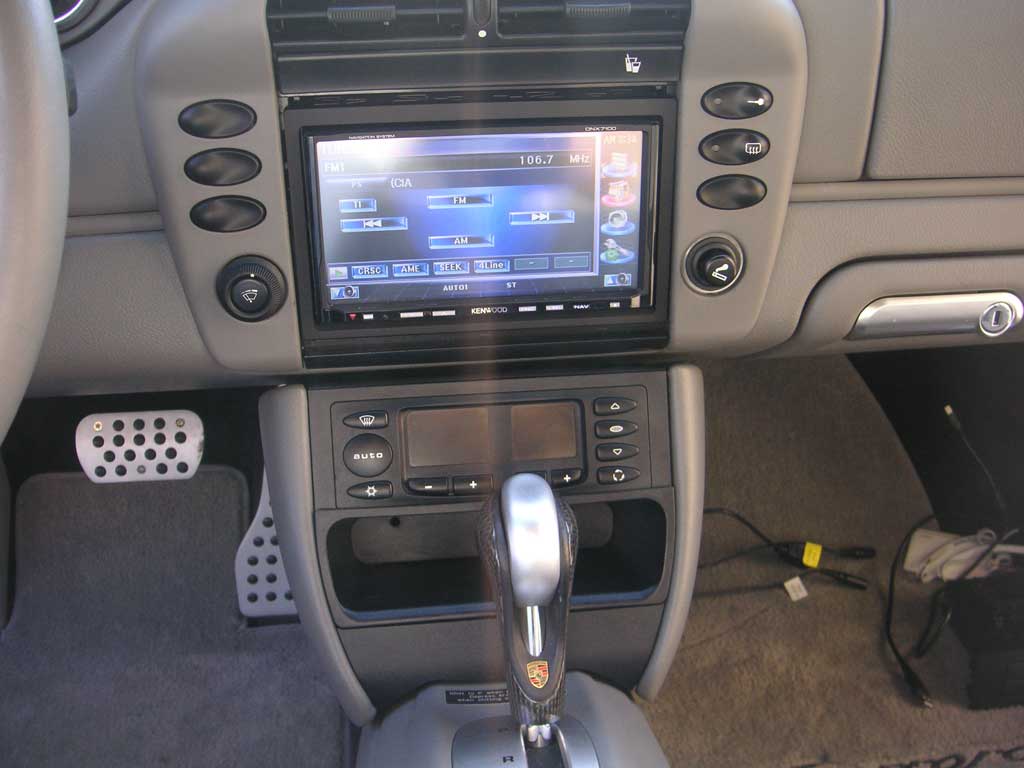
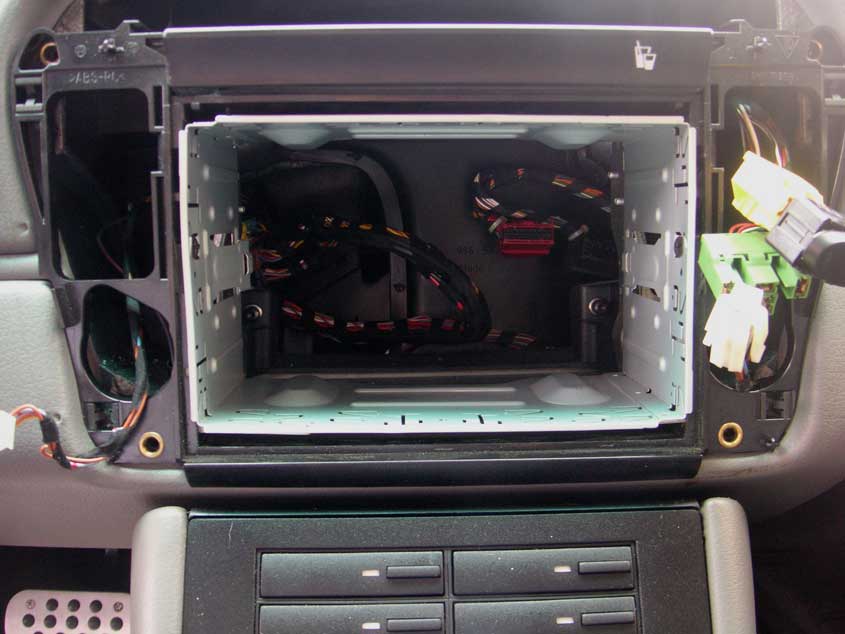
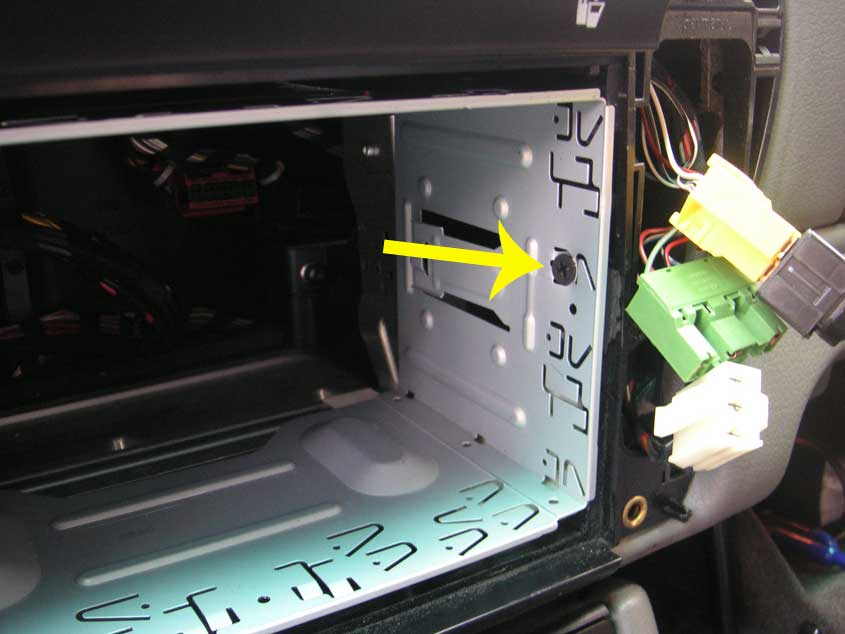
I chose to secure the cage for the kenwood with screws through either side of the cage into the console frame. This allowed me to set the height of the unit in the opening much easier, and it is very secure.
Closeup of right side screw point.
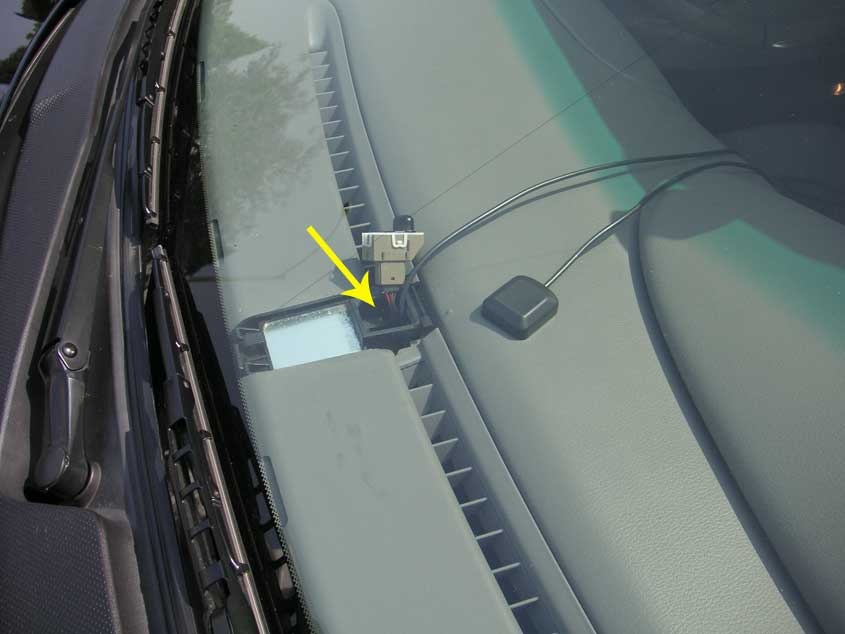
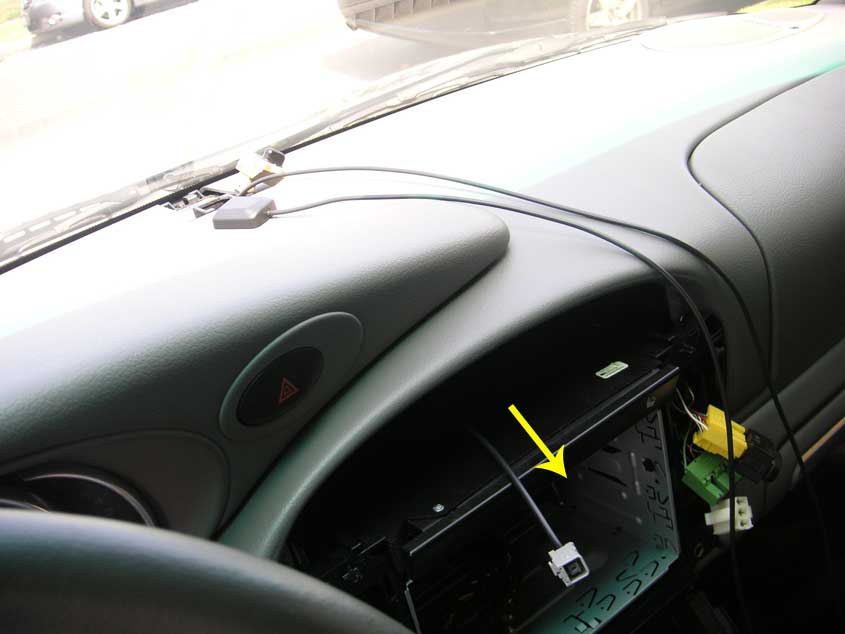
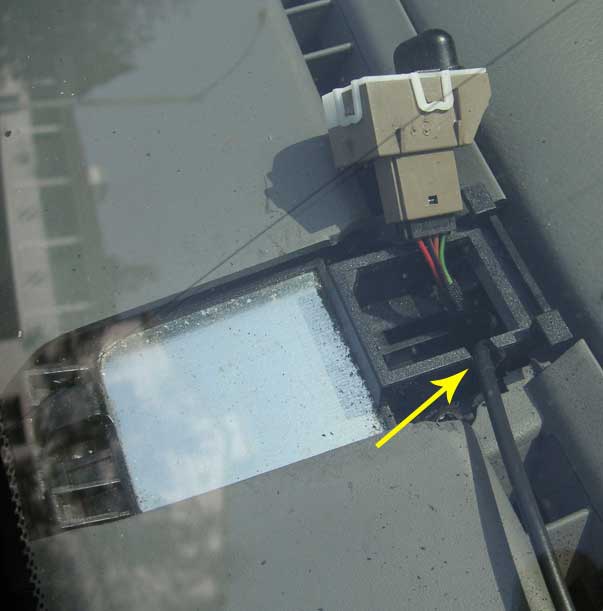
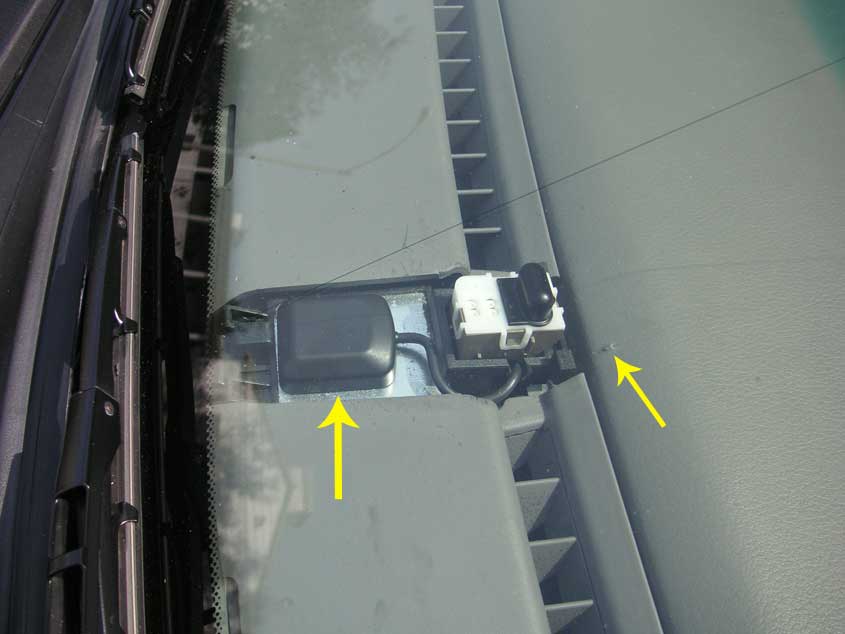
Some shots of the NAV antenna placement and running the cable. It is actually quite simple to do.
Toughest part was popping up the alarm indicator cover without damaging anything. It was very tough to take off, as you can see from the lower picture showing a slight bit of damage to my dash. fortunately this bo-bo is under the cover and out of sight. The cover pops up from the back (closest to you).
run cable down through opening for the alarm indicator
reach through the console opening and fish it through with your hand.
Carefully make a notch for the cable on the side plastic with a dremel, otherwise the alarm indicator wil not sit back down in the socket.
My antenna was magnetic so i just stuck it right on the metal (per the instructions with my unit). All done! Again, be careful with the hand tools around the dash (don't be like me...lol).
Overall, the kenwood made a nice improvement in sound (running through the bose factory amp...for now). Next I will replace the amp and all of the speakers.
A lot of careful grinding to get the AC control, pocket and trim to fit neatly.
Still not finished, there is a slight lip on the lower pocket and need to make a more fitted trim ring for the kenwood. That is on tomorrow's to-do list
.Here's some pics- I took a few extra shots of the NAV antenna install, found a great spot for it!.
I chose to secure the cage for the kenwood with screws through either side of the cage into the console frame. This allowed me to set the height of the unit in the opening much easier, and it is very secure.
Closeup of right side screw point.
Some shots of the NAV antenna placement and running the cable. It is actually quite simple to do.
Toughest part was popping up the alarm indicator cover without damaging anything. It was very tough to take off, as you can see from the lower picture showing a slight bit of damage to my dash. fortunately this bo-bo is under the cover and out of sight. The cover pops up from the back (closest to you).
run cable down through opening for the alarm indicator
reach through the console opening and fish it through with your hand.
Carefully make a notch for the cable on the side plastic with a dremel, otherwise the alarm indicator wil not sit back down in the socket.
My antenna was magnetic so i just stuck it right on the metal (per the instructions with my unit). All done! Again, be careful with the hand tools around the dash (don't be like me...lol).
Overall, the kenwood made a nice improvement in sound (running through the bose factory amp...for now). Next I will replace the amp and all of the speakers.
Last edited by p0rsch3; May 27, 2007 at 09:17 PM.
Registered User
Joined: Apr 2007
Posts: 3,123
From: Chained to my Laptop....
Rep Power: 172
nope -where is the alarm panel? I am admittedly very new to pcars so no way to know.
Where I installed it under the alarm indicator though, literally took me 10 minutes.
Where I installed it under the alarm indicator though, literally took me 10 minutes.
Registered User
Joined: Jun 2004
Posts: 3,187
From: Newport Beach, Ca.
Rep Power: 150
Originally Posted by p0rsch3
nope -where is the alarm panel? I am admittedly very new to pcars so no way to know.
Where I installed it under the alarm indicator though, literally took me 10 minutes.
Where I installed it under the alarm indicator though, literally took me 10 minutes.
Registered User
Joined: Apr 2007
Posts: 3,123
From: Chained to my Laptop....
Rep Power: 172
hmm- I didn't have any issue with fitting the antenna, plenty of room / no mods needed to fit the entire unit under the panel cap, just pop it back on..
how did you route the wire? I found the easiest route was down through the alarm indicator channel, but a notch was required due to the thick diameter of the NAV cable.
how did you route the wire? I found the easiest route was down through the alarm indicator channel, but a notch was required due to the thick diameter of the NAV cable.
Registered User
Joined: Jun 2004
Posts: 3,187
From: Newport Beach, Ca.
Rep Power: 150
Originally Posted by p0rsch3
hmm- I didn't have any issue with fitting the antenna, plenty of room / no mods needed to fit the entire unit under the panel cap, just pop it back on..
how did you route the wire? I found the easiest route was down through the alarm indicator channel, but a notch was required due to the thick diameter of the NAV cable.
how did you route the wire? I found the easiest route was down through the alarm indicator channel, but a notch was required due to the thick diameter of the NAV cable.