Aston Martin DB7, DB9, DBS, Vantage V8, Vanquish, and Classic models

Aston Martin Garmin update?

Old Apr 6, 2016 | 11:10 PM
  #1  
mrgylex's Avatar
Thread Starter
|
Registered User
10 Year Member
Joined: Jul 2015
Posts: 31
From: New York
Rep Power: 12
mrgylex is infamous around these parts
Aston Martin Garmin update?

How does one update the SatNav on the MY12+ models holding the Garmin systems.

I went to Garmin and nothing is available, the dealership said go to the Nav vendor.

Has anyone gone through the update process? My SatNav keeps alerting me to update the system.

Let me know your thoughts

 
Old Apr 7, 2016 | 08:24 AM
  #2  
kaj's Avatar
kaj
Registered User
10 Year Member
Joined: Apr 2013
Posts: 66
From: Houston
Rep Power: 16
kaj is infamous around these parts
Originally Posted by mrgylex
How does one update the SatNav on the MY12+ models holding the Garmin systems. I went to Garmin and nothing is available, the dealership said go to the Nav vendor. Has anyone gone through the update process? My SatNav keeps alerting me to update the system. Let me know your thoughts
I updated mine once during the annual service at the Aston dealer. If you look at the Nav unit box in the trunk (driver's side forward area of trunk behind a cover panel I think), you'll see it has an SD card slot if you open the front cover on it. That is where the dealer inserts the card to perform the update. I seem to recall it cost around $180. I can take a pic if you can't find the box.
 
Old Apr 7, 2016 | 08:33 AM
  #3  
telum01's Avatar
Registered User
15 Year Member
Joined: Apr 2009
Posts: 4,366
From: NoVa
Rep Power: 295
telum01 Is a GOD !telum01 Is a GOD !telum01 Is a GOD !telum01 Is a GOD !telum01 Is a GOD !telum01 Is a GOD !telum01 Is a GOD !telum01 Is a GOD !telum01 Is a GOD !telum01 Is a GOD !telum01 Is a GOD !
Originally Posted by kaj
I updated mine once during the annual service at the Aston dealer. If you look at the Nav unit box in the trunk (driver's side forward area of trunk behind a cover panel I think), you'll see it has an SD card slot if you open the front cover on it. That is where the dealer inserts the card to perform the update. I seem to recall it cost around $180. I can take a pic if you can't find the box.
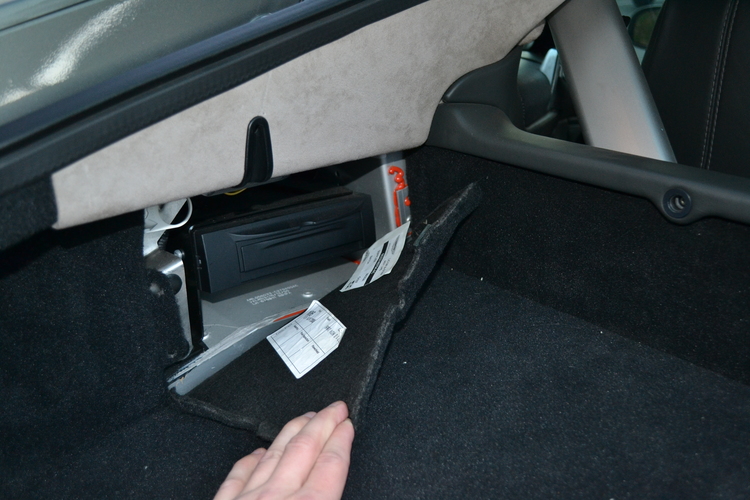
If the Garmin is in the same spot as the old DVD-based system:

 
Old Apr 7, 2016 | 07:58 PM
  #4  
deckman's Avatar
Registered User
15 Year Member
Joined: Aug 2007
Posts: 2,699
From: MD
Rep Power: 173
deckman Is a GOD !deckman Is a GOD !deckman Is a GOD !deckman Is a GOD !deckman Is a GOD !deckman Is a GOD !deckman Is a GOD !deckman Is a GOD !deckman Is a GOD !deckman Is a GOD !deckman Is a GOD !
The dealer has to do it I think.
 
Old Apr 8, 2016 | 07:14 AM
  #5  
Jarod's Avatar
Registered User
10 Year Member
Joined: Jul 2011
Posts: 68
Rep Power: 18
Jarod has a spectacular aura aboutJarod has a spectacular aura about
What do you mean with update? Updating the firmware of the nav unit, then most likely the dealer has to do it (if possible at all).

If you mean installing updated maps then you can simply purchase the Garmin City Navigator SD card (https://buy.garmin.com/en-US/US/maps...ARD_01-p1.html) and plug it into the sat-nav unit in the trunk. It worked like a charm for my MY14 V12s. Assuming the nav system is the same in your MY12.

You need to keep the SD in the unit, though as the maps will be loaded from the SD card. They will not be installed (copied) to the nav system. Once you remove the card, the sat-nav will use the old (pre-installed) maps again.

BTW. You can easily load custom POIs (like speed cameras) into the nav system using the SD card. There is a tool from Garmin called POI loader for that. Though not sure if this is legal in your state/country.

 
Old May 14, 2016 | 07:52 PM
  #6  
cuddapah's Avatar
Registered User
10 Year Member
Joined: Nov 2014
Posts: 369
From: Saint Johns, FL
Rep Power: 47
cuddapah has a reputation beyond reputecuddapah has a reputation beyond reputecuddapah has a reputation beyond reputecuddapah has a reputation beyond reputecuddapah has a reputation beyond reputecuddapah has a reputation beyond reputecuddapah has a reputation beyond reputecuddapah has a reputation beyond reputecuddapah has a reputation beyond reputecuddapah has a reputation beyond reputecuddapah has a reputation beyond repute
I am looking for the location of the slot in the 2015 DB9. Can you post location of the slot in your car ? Maybe a zoom out pic .. Thanks !
 
Old May 15, 2016 | 08:34 AM
  #7  
J doubleU's Avatar
Registered User
10 Year Member
Joined: Mar 2013
Posts: 2,418
From: So Cal
Rep Power: 261
J doubleU Is a GOD !J doubleU Is a GOD !J doubleU Is a GOD !J doubleU Is a GOD !J doubleU Is a GOD !J doubleU Is a GOD !J doubleU Is a GOD !J doubleU Is a GOD !J doubleU Is a GOD !J doubleU Is a GOD !J doubleU Is a GOD !
Your navigation unit in under the sub woofer under the left rear seat. The lower carpet at the kick board pulls off easily.
 
Old May 15, 2016 | 09:42 AM
  #8  
cuddapah's Avatar
Registered User
10 Year Member
Joined: Nov 2014
Posts: 369
From: Saint Johns, FL
Rep Power: 47
cuddapah has a reputation beyond reputecuddapah has a reputation beyond reputecuddapah has a reputation beyond reputecuddapah has a reputation beyond reputecuddapah has a reputation beyond reputecuddapah has a reputation beyond reputecuddapah has a reputation beyond reputecuddapah has a reputation beyond reputecuddapah has a reputation beyond reputecuddapah has a reputation beyond reputecuddapah has a reputation beyond repute
You mean the heel board behind the driver seat ? I pulled off that board and saw this.Couldn't take a clearer pic. Where is the SD Card Slot ?
I am asking this so I could get latest SD Card from Garmin (as posted in this thread) and stick it in there. The last time I let the dealer do it, I paid $200+.

Originally Posted by J doubleU
Your navigation unit in under the sub woofer under the left rear seat. The lower carpet at the kick board pulls off easily.
 
Attached Thumbnails Click image for larger version

Name:	IMG_1443.jpg
Views:	604
Size:	3.28 MB
ID:	448684  
Old May 15, 2016 | 10:19 AM
  #9  
J doubleU's Avatar
Registered User
10 Year Member
Joined: Mar 2013
Posts: 2,418
From: So Cal
Rep Power: 261
J doubleU Is a GOD !J doubleU Is a GOD !J doubleU Is a GOD !J doubleU Is a GOD !J doubleU Is a GOD !J doubleU Is a GOD !J doubleU Is a GOD !J doubleU Is a GOD !J doubleU Is a GOD !J doubleU Is a GOD !J doubleU Is a GOD !
That's the unit, the front panel pulls out and the SD card slot is in the middle.
 
Old May 15, 2016 | 12:35 PM
  #10  
deckman's Avatar
Registered User
15 Year Member
Joined: Aug 2007
Posts: 2,699
From: MD
Rep Power: 173
deckman Is a GOD !deckman Is a GOD !deckman Is a GOD !deckman Is a GOD !deckman Is a GOD !deckman Is a GOD !deckman Is a GOD !deckman Is a GOD !deckman Is a GOD !deckman Is a GOD !deckman Is a GOD !
Just ordered the SD card from Garmin
 
Old May 15, 2016 | 01:06 PM
  #11  
cuddapah's Avatar
Registered User
10 Year Member
Joined: Nov 2014
Posts: 369
From: Saint Johns, FL
Rep Power: 47
cuddapah has a reputation beyond reputecuddapah has a reputation beyond reputecuddapah has a reputation beyond reputecuddapah has a reputation beyond reputecuddapah has a reputation beyond reputecuddapah has a reputation beyond reputecuddapah has a reputation beyond reputecuddapah has a reputation beyond reputecuddapah has a reputation beyond reputecuddapah has a reputation beyond reputecuddapah has a reputation beyond repute
Got it ! Thank you very much !

Originally Posted by J doubleU
That's the unit, the front panel pulls out and the SD card slot is in the middle.
 
Old May 15, 2016 | 01:07 PM
  #12  
cuddapah's Avatar
Registered User
10 Year Member
Joined: Nov 2014
Posts: 369
From: Saint Johns, FL
Rep Power: 47
cuddapah has a reputation beyond reputecuddapah has a reputation beyond reputecuddapah has a reputation beyond reputecuddapah has a reputation beyond reputecuddapah has a reputation beyond reputecuddapah has a reputation beyond reputecuddapah has a reputation beyond reputecuddapah has a reputation beyond reputecuddapah has a reputation beyond reputecuddapah has a reputation beyond reputecuddapah has a reputation beyond repute
Is this the one you ordered ?
City Navigator® North America NT
Part Number: 010-11551-00


Originally Posted by deckman
Just ordered the SD card from Garmin
 
Old May 15, 2016 | 02:39 PM
  #13  
deckman's Avatar
Registered User
15 Year Member
Joined: Aug 2007
Posts: 2,699
From: MD
Rep Power: 173
deckman Is a GOD !deckman Is a GOD !deckman Is a GOD !deckman Is a GOD !deckman Is a GOD !deckman Is a GOD !deckman Is a GOD !deckman Is a GOD !deckman Is a GOD !deckman Is a GOD !deckman Is a GOD !
Originally Posted by cuddapah
Is this the one you ordered ?
City Navigator® North America NT
Part Number: 010-11551-00
Yes that is it.
 
Old May 19, 2016 | 06:23 PM
  #14  
cuddapah's Avatar
Registered User
10 Year Member
Joined: Nov 2014
Posts: 369
From: Saint Johns, FL
Rep Power: 47
cuddapah has a reputation beyond reputecuddapah has a reputation beyond reputecuddapah has a reputation beyond reputecuddapah has a reputation beyond reputecuddapah has a reputation beyond reputecuddapah has a reputation beyond reputecuddapah has a reputation beyond reputecuddapah has a reputation beyond reputecuddapah has a reputation beyond reputecuddapah has a reputation beyond reputecuddapah has a reputation beyond repute
Did you get yours ? I am waiting for mine. If you got yours please let me know which year maps are on the SD Card.
I had maps updated by the dealer in September 2015. I didn't notice at that time. I just checked and they are 2014 maps .. not even 2015. Hopefully the SD card will have 2016 maps.

Originally Posted by deckman
Yes that is it.
 
Old May 19, 2016 | 06:41 PM
  #15  
kaj's Avatar
kaj
Registered User
10 Year Member
Joined: Apr 2013
Posts: 66
From: Houston
Rep Power: 16
kaj is infamous around these parts
Originally Posted by Jarod
What do you mean with update? Updating the firmware of the nav unit, then most likely the dealer has to do it (if possible at all). If you mean installing updated maps then you can simply purchase the Garmin City Navigator SD card (https://buy.garmin.com/en-US/US/maps...ARD_01-p1.html) and plug it into the sat-nav unit in the trunk. It worked like a charm for my MY14 V12s. Assuming the nav system is the same in your MY12. You need to keep the SD in the unit, though as the maps will be loaded from the SD card. They will not be installed (copied) to the nav system. Once you remove the card, the sat-nav will use the old (pre-installed) maps again. BTW. You can easily load custom POIs (like speed cameras) into the nav system using the SD card. There is a tool from Garmin called POI loader for that. Though not sure if this is legal in your state/country.
Did using the Garmin update affect the Aston Martin start-up screen or being able to use a little Aston as the car logo?
 

Thread Tools
Rate This Thread
Rate This Thread:
You have already rated this thread Rating: Thread Rating: 0 votes,  average.


All times are GMT -6. The time now is 09:33 AM.