


Garage Door Programming help! Continental GT

Registered User
Joined: Apr 2010
Posts: 2,730
From: Worldwide
Rep Power: 147


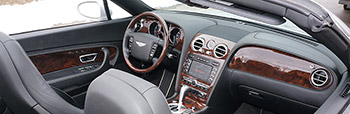
Yes, for left-hand drive it is inside the car's passenger side just above the far right section of the dashboard. I find it is easier to sit in the passenger seat and then go through the programming operations.
Last edited by stevenrmusic; Apr 10, 2014 at 09:32 AM.

Registered User
Joined: Apr 2014
Posts: 30
From: Minnesota
Rep Power: 14
Ditto - I couldn't reach far enough to the right while sitting in the driver's seat.

Registered User
Joined: Jan 2012
Posts: 17
From: California
Rep Power: 0

This thread has helped me in the past, and I've been able to get homelink working on my GT for our garage door. But it looks like I am back at square one.
We just moved to a new house, and after successfully programming our Toyota and Mercedes (both easy and by the book) , I have not been able to get my Bentley to accept our Liftmaster Security+ garage door opener. I have followed the details of this thread to the T, but to no avail.
Here's where things fail - I clear all previous codes by pressing the #1 and #3 buttons, and get a confirmation fast blink. Then I pres the #1 button, along with our new garage door remote button, and it only changes from the slow blink to no light at all - no fast blinking as it should show. I have held the remote in the center of the dash (above the analog clock), and progressively further right but no location gets me the fast blinking.
Any ideas on why I can't get Homelink to work?
We just moved to a new house, and after successfully programming our Toyota and Mercedes (both easy and by the book) , I have not been able to get my Bentley to accept our Liftmaster Security+ garage door opener. I have followed the details of this thread to the T, but to no avail.
Here's where things fail - I clear all previous codes by pressing the #1 and #3 buttons, and get a confirmation fast blink. Then I pres the #1 button, along with our new garage door remote button, and it only changes from the slow blink to no light at all - no fast blinking as it should show. I have held the remote in the center of the dash (above the analog clock), and progressively further right but no location gets me the fast blinking.
Any ideas on why I can't get Homelink to work?
Registered User
Joined: Jan 2012
Posts: 17
From: California
Rep Power: 0
Thanks for your feedback......I just tried moving the remote to the the far right, and nothing happened, but something did happen as I flailed my arms in failure.
My remote code was "learned" when, with frustration, I waved the remote on the left side of the dash, nearly dead ahead of the steering wheel. I even was able to repeat this a second time.....so it looks like for my car, the sensor is somewhere between the center of the dash and the LEFT side of the car.
I can happily now open our garage doors - thanks!
My remote code was "learned" when, with frustration, I waved the remote on the left side of the dash, nearly dead ahead of the steering wheel. I even was able to repeat this a second time.....so it looks like for my car, the sensor is somewhere between the center of the dash and the LEFT side of the car.
I can happily now open our garage doors - thanks!

Registered User
Joined: Jan 2016
Posts: 2
From: Maryland's Eastern Shore
Rep Power: 0
 Programming Garage doors
This was kicking my ***. The Manual gets you almost there but your comments below really helped.
If you are losing the fight. Try this.
key in ignition, turn one click clockwise but do not start engine
Clear old code by holding 1 & 3 buttons for 20-30 seconds (until it flashes fast)
then sit in the passenger seat.
Hold your garage door opener up by the bottom of the windsheild and press the button, hold the corresponding 'Homelink' button. This only takes a few seconds until it get the codes (you will see rapid flashing of the button). Continue if you need to do 2 & 3.
Then if you have rolling codes, press the LEARN button on the garage door motor housing, jump off the ladder sit in the car and repeatedly press button 2-3 times, until the garage door opens/closes. Repeat for each garage door.
Good Luck! Worked on my 06 Bentley GT.
If you are losing the fight. Try this.
key in ignition, turn one click clockwise but do not start engine
Clear old code by holding 1 & 3 buttons for 20-30 seconds (until it flashes fast)
then sit in the passenger seat.
Hold your garage door opener up by the bottom of the windsheild and press the button, hold the corresponding 'Homelink' button. This only takes a few seconds until it get the codes (you will see rapid flashing of the button). Continue if you need to do 2 & 3.
Then if you have rolling codes, press the LEARN button on the garage door motor housing, jump off the ladder sit in the car and repeatedly press button 2-3 times, until the garage door opens/closes. Repeat for each garage door.
Good Luck! Worked on my 06 Bentley GT.

Registered User
Joined: Dec 2015
Posts: 3
From: Escondido, CA
Rep Power: 0
While pressing one of the garage door buttons, the garage door remote has to be held on the passenger side, lower windshield above the glove box. The programming sensor is actually in the dash. I struggled with this as well.
Registered User

Joined: Sep 2012
Posts: 1,489
From: Florida
Rep Power: 105
Thanks. I have had my 2009 Bentley and with your help I have finally been able to program the home link. I have tried several times before with no luck. This is the first time that I read to put the transmitter 2" away from the bottom right hand corner of the wind screen. I think the key here was 2"
Registered User

Joined: Jun 2017
Posts: 623
From: Naples FL
Rep Power: 44
I'm late to the party here but hope someone may find this useful. Some of the newer rolling code openers (Liftmaster/Chamberlain/Sears for sure) - mine are 2014 models -
may not work with older versions of Homelink. My '98 Jag and '09 Continental GT are two examples. Homelink offers a "Compatibility Bridge" #855LM that will solve the problem for under $25 (see Amazon). One bridge will handle multiple doors and cars. The bridge plugs into an outlet in the garage, preferably one on the ceiling with the opener. The one button remote included with the bridge is used to program each button in the car. In the GT follow the instructions in the book and press & hold the remote against the raised trim piece near the right lower corner of the windscreen while pressing the button you wish to program. The slow flash will turn to rapid in less than 10 seconds. Next, climb a ladder and press the Learn button on the opener once and the light will be on steady. Get back in the car and press AND HOLD the programmed button till the opener lights flash, about 2 seconds. Press again and the door should close. Done!
may not work with older versions of Homelink. My '98 Jag and '09 Continental GT are two examples. Homelink offers a "Compatibility Bridge" #855LM that will solve the problem for under $25 (see Amazon). One bridge will handle multiple doors and cars. The bridge plugs into an outlet in the garage, preferably one on the ceiling with the opener. The one button remote included with the bridge is used to program each button in the car. In the GT follow the instructions in the book and press & hold the remote against the raised trim piece near the right lower corner of the windscreen while pressing the button you wish to program. The slow flash will turn to rapid in less than 10 seconds. Next, climb a ladder and press the Learn button on the opener once and the light will be on steady. Get back in the car and press AND HOLD the programmed button till the opener lights flash, about 2 seconds. Press again and the door should close. Done!

Registered User
Joined: Sep 2023
Posts: 4
From: Ellijay, Ga
Rep Power: 0
I'm late to the party here but hope someone may find this useful. Some of the newer rolling code openers (Liftmaster/Chamberlain/Sears for sure) - mine are 2014 models -
may not work with older versions of Homelink. My '98 Jag and '09 Continental GT are two examples. Homelink offers a "Compatibility Bridge" #855LM that will solve the problem for under $25 (see Amazon). One bridge will handle multiple doors and cars. The bridge plugs into an outlet in the garage, preferably one on the ceiling with the opener. The one button remote included with the bridge is used to program each button in the car. In the GT follow the instructions in the book and press & hold the remote against the raised trim piece near the right lower corner of the windscreen while pressing the button you wish to program. The slow flash will turn to rapid in less than 10 seconds. Next, climb a ladder and press the Learn button on the opener once and the light will be on steady. Get back in the car and press AND HOLD the programmed button till the opener lights flash, about 2 seconds. Press again and the door should close. Done!
may not work with older versions of Homelink. My '98 Jag and '09 Continental GT are two examples. Homelink offers a "Compatibility Bridge" #855LM that will solve the problem for under $25 (see Amazon). One bridge will handle multiple doors and cars. The bridge plugs into an outlet in the garage, preferably one on the ceiling with the opener. The one button remote included with the bridge is used to program each button in the car. In the GT follow the instructions in the book and press & hold the remote against the raised trim piece near the right lower corner of the windscreen while pressing the button you wish to program. The slow flash will turn to rapid in less than 10 seconds. Next, climb a ladder and press the Learn button on the opener once and the light will be on steady. Get back in the car and press AND HOLD the programmed button till the opener lights flash, about 2 seconds. Press again and the door should close. Done!
Registered User
Joined: Jun 2017
Posts: 623
From: Naples FL
Rep Power: 44
Appreciate your letting us know it worked for you!
Registered User
Joined: Jun 2024
Posts: 32
Rep Power: 13
I also just added the bridge and now both the 2006 GT and 2008 BMW 535xi work. The new openers have the 2.0+ security and the remote for the new openers would not train the cars. The bridge remote did train the cars and then had to push the learn button on the openers to link the cars to the openers. I had to push the homelink button in the cars several times to sync up the rolling code. Need to save the bridge remote to train any future older cars.
Registered User
Joined: May 2024
Posts: 78
From: Florida
Rep Power: 0
After much consternation, frustration, deliberation and downright didsapointment I am finally able to open my garage door with my Bentley button. The trick was finding the location of where the garage sensor is in the car. In my case the sensor is not on the right side of the car as most videos and readers indicated, but the left side above the instrumental panel on the dash. Here are the steps:
1. Press the Bentley buttons 1 and 3 simultaneously to remove all previously stored codes. The led lights will blink slow then fast indicating success.
2. While pressing the remote control for the garage and your Bentley button (my case #1) MOVE the remote on the left or right of the dashboard to find the sensor. The lights will blink fast indicating success. My sensor is on the left of the dashboard.
3. Press the “learned” button on the garage door opened. Lights stays on for approximately 30 seconds.
4. Press and hold your Bentley button (my case #1) until the garage lights begin to blink. This indicate the Bentley button has synced with the garage door opener.
5. Confirm operation by pressing your programmed Bentley button once again and the garage door should respond by closing.
Hope this helps!
Brian.
1. Press the Bentley buttons 1 and 3 simultaneously to remove all previously stored codes. The led lights will blink slow then fast indicating success.
2. While pressing the remote control for the garage and your Bentley button (my case #1) MOVE the remote on the left or right of the dashboard to find the sensor. The lights will blink fast indicating success. My sensor is on the left of the dashboard.
3. Press the “learned” button on the garage door opened. Lights stays on for approximately 30 seconds.
4. Press and hold your Bentley button (my case #1) until the garage lights begin to blink. This indicate the Bentley button has synced with the garage door opener.
5. Confirm operation by pressing your programmed Bentley button once again and the garage door should respond by closing.
Hope this helps!
Brian.

Thread
Thread Starter
Forum
Replies
Last Post
09, bentley, brooklands, button, continental, door, garage, gate, gt, johnson, liftmaster, opener, program, programming, troubleshooting
