


iPad Mini in-dash install [996 MkII]


Registered User
Joined: Aug 2013
Posts: 61
Rep Power: 15

Good point Whereitsat. I also have the RCA, amp, etc. I'll have to track down which Metra harness I ended up using (I bought 2 different ones, because I read that's what I had to do, which is false). I'll try to get a picture of how I wired it as well. It was easy, once I figured out which way to do it. That was probably the longest part of the process.

Registered User
Joined: Aug 2012
Posts: 27
From: Bedford, TX
Rep Power: 15
Hey Bruce, I'm pretty happy with them. I think the setup is a heck of a lot better, and cooler, than a bland ol' Double Din head unit. You can do plenty of things with it, and the list will just keep growing.
The unit I have (Others may do the same), interfaces pretty good with the iPad. It can control the library, Pandora, cell blue tooth (for my phone). One other bonus of the unit I have, it has 2 USB inputs. Therefore, I ran one USB cable to the elbow/arm support thingy. I just drop my phone in there when I get in, it charges it, and I can then control the iPhone from the headunit as well.
Essentially, it charges both (iPad and iPhone), and I have the ability to use whichever I want for music, pandora, etc.
The unit I have (Others may do the same), interfaces pretty good with the iPad. It can control the library, Pandora, cell blue tooth (for my phone). One other bonus of the unit I have, it has 2 USB inputs. Therefore, I ran one USB cable to the elbow/arm support thingy. I just drop my phone in there when I get in, it charges it, and I can then control the iPhone from the headunit as well.
Essentially, it charges both (iPad and iPhone), and I have the ability to use whichever I want for music, pandora, etc.

Modaholic

Joined: Jul 2003
Posts: 2,878
From: Fresno Cali
Rep Power: 165

Hey Kevin, I have an 2001, and did this myself. Grant you, the process is a little bit different, but, using PFBZ's example as guidance, it was pretty easy (if not a little time consuming due to grinding the plastic away).
I didn't take any pics, but, I'm going to get an LTE iPad Mini, and will install that in place of the iPad wifi I put in there now (I already had the wifi one, just wanted to play with it). I'll get some pics then for you.
One note, my AC unit was already in the very lower level. I purchased a single DIN Pioneer (DEH-80PRS) and installed that right above the AC unit (where storage area was). I had to remove the original unit from the 2nd slot down, and the cupholders from the top slot.
Also, I did not have the Bose system.
I didn't take any pics, but, I'm going to get an LTE iPad Mini, and will install that in place of the iPad wifi I put in there now (I already had the wifi one, just wanted to play with it). I'll get some pics then for you.
One note, my AC unit was already in the very lower level. I purchased a single DIN Pioneer (DEH-80PRS) and installed that right above the AC unit (where storage area was). I had to remove the original unit from the 2nd slot down, and the cupholders from the top slot.
Also, I did not have the Bose system.
That would be great, this my current setup so I'm half way there, just need to Mini in the top area..

Thread Starter
|
Registered User
Joined: Sep 2012
Posts: 282
Rep Power: 27
I'm using the Pioneer DEH-X9500BHS (very similar to the DEH-80PRS) and pretty happy with the Pioneer/iPad combo.
Couple of comments specifically on this interface:
Couple of comments specifically on this interface:
- It does a great job integrating music input with Pandora, Slacker, and direct music files on the iPad. I never use the radio anymore... One minor gripe about Pandora/Pioneer. They integrate so that you can control everything, select playlists, etc from the radio but there is no way to disable this! You simply can not control pandora on the iPad once you change the Pioneer mode to Pandora. Using Slacker, however, sidesteps this issue.
- The Pioneer does a better job managing with the USB interface than any other commodity car stereo I've tested. The charge current is sufficient to keep the iPad charged, but if the ipad is fully drained, the Pioneer USB current isn't enough to immediately turn the iPad on when you turn on the car. (eg I manually turn the ipad on in the garage with the car/pioneer off so it can update all the apps through my home wifi, and then I forget to go turn it off again, and leave the car sit for a few days. iPad then fully discharged.)
- Using a USB extension cable from the radio and connecting the iPad charge cable in an accessible spot makes things much easier.
- The display on the Pioneer could be a bit better... It's nice that you can adjust the color, but I find that when I set it to match the Porsche amber, it's a bit hard to read, especially with sunglasses and 52 year old eyes. Setting the display color to a light shade of blue makes it a bit easier for me to read.
- Pioneer (and just about every other company in the world) could take a few lessons from Apple in user interface design. The Pioneer isn't bad, but sometimes is a bit frustrating...
Last edited by pfbz; Sep 17, 2013 at 10:56 PM.
Registered User
Joined: Aug 2012
Posts: 27
From: Bedford, TX
Rep Power: 15
Thanks PFBZ. I have seen others comment about Pandora and Pioneer several times now. I don't understand why companies do what they do sometimes. Maybe someday Apple will make a car audio system. But then Apple does some frustrating things too. I really like the iPad mini idea, but I need to do some more research on head units. They all have there pluses and minuses. My 52 year old eyes can't live without cheaters anymore! Thanks again for the great comments!
Registered User
Joined: Aug 2013
Posts: 61
Rep Power: 15
pfbz makes some great points about the integration and installation. Using his direction, as well as my own brain power, I was able to do this on a 2001. Attached are some images showing how I handled it. Let me know if you have any questions, and I'll see what I can do.
It's actually relatively easy. Just have a to be a bit creative. I'm going to work on mine to make it a little cleaner here the next few days. But, that's more OCD on my part, since it's hidden.
Biggest tip I have, is to use Painters Tape to get straight lines in the channels (outlined below).
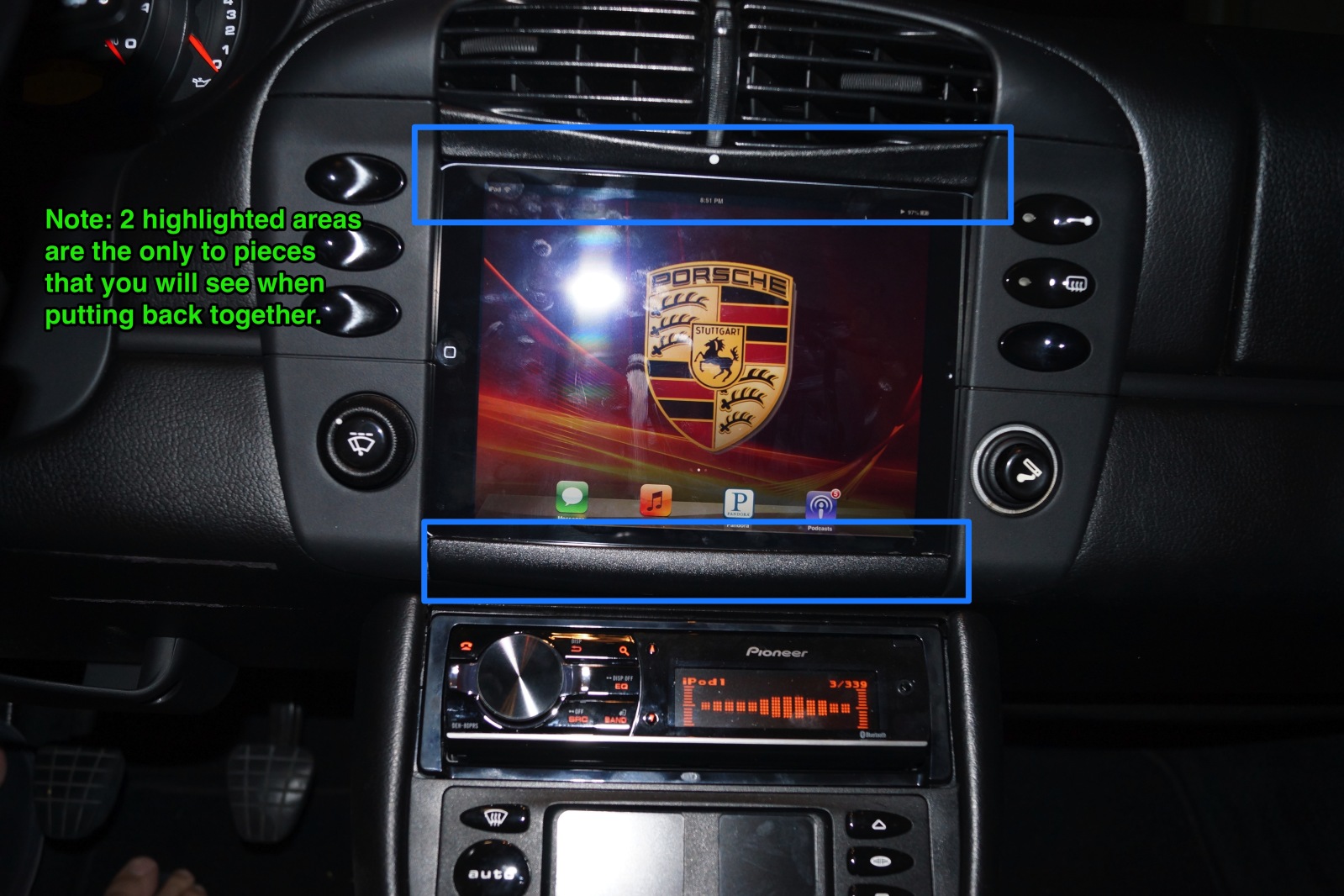
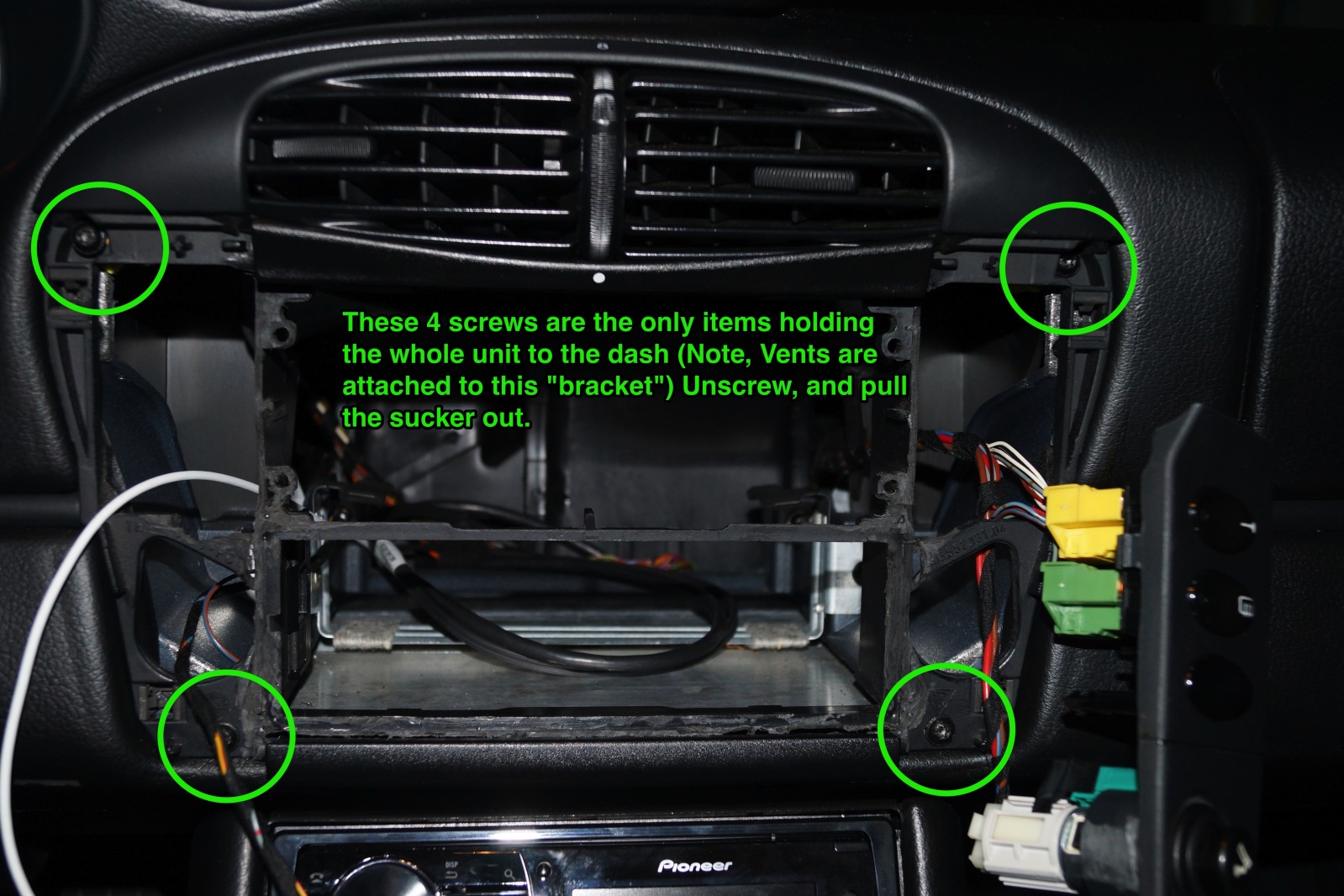
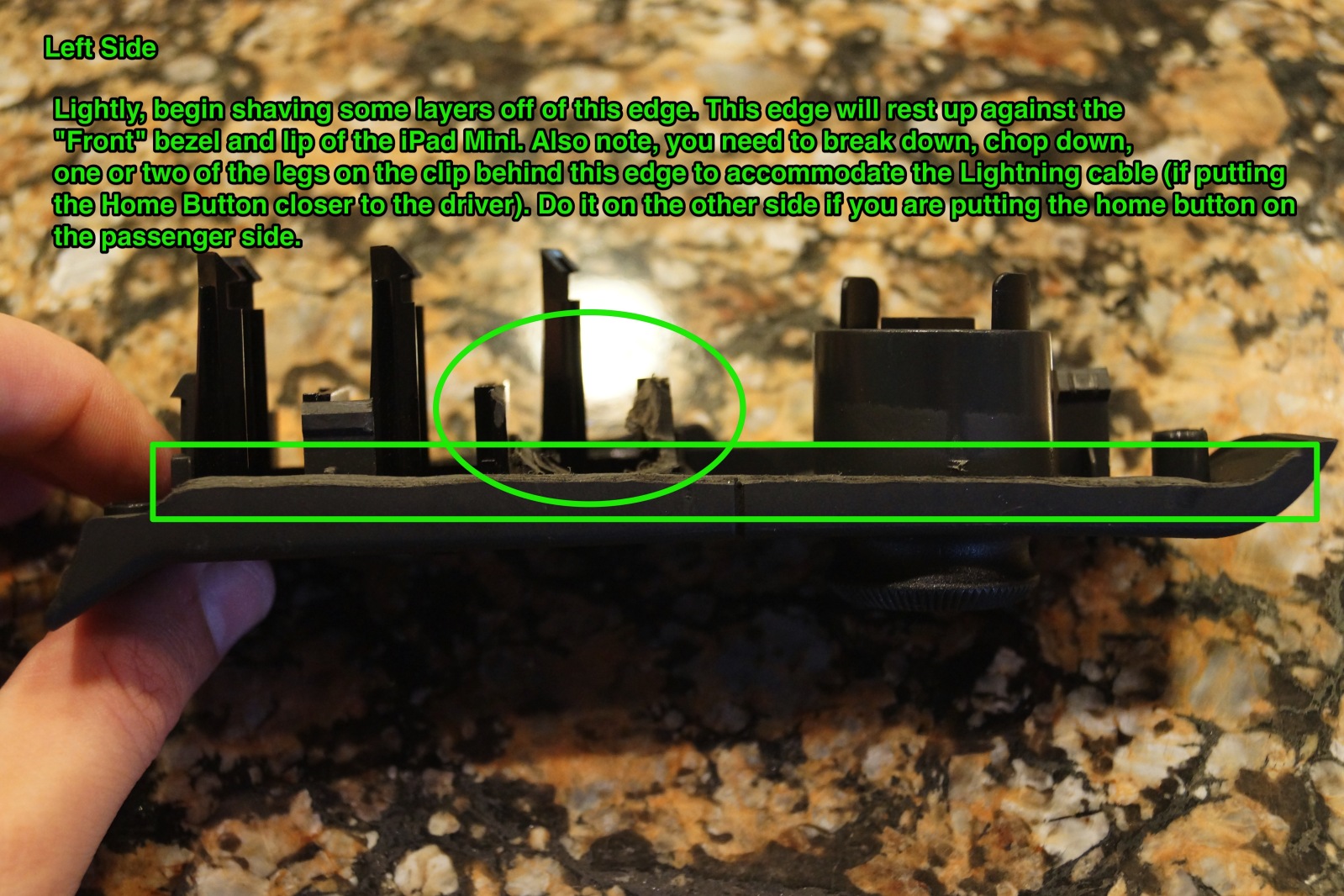
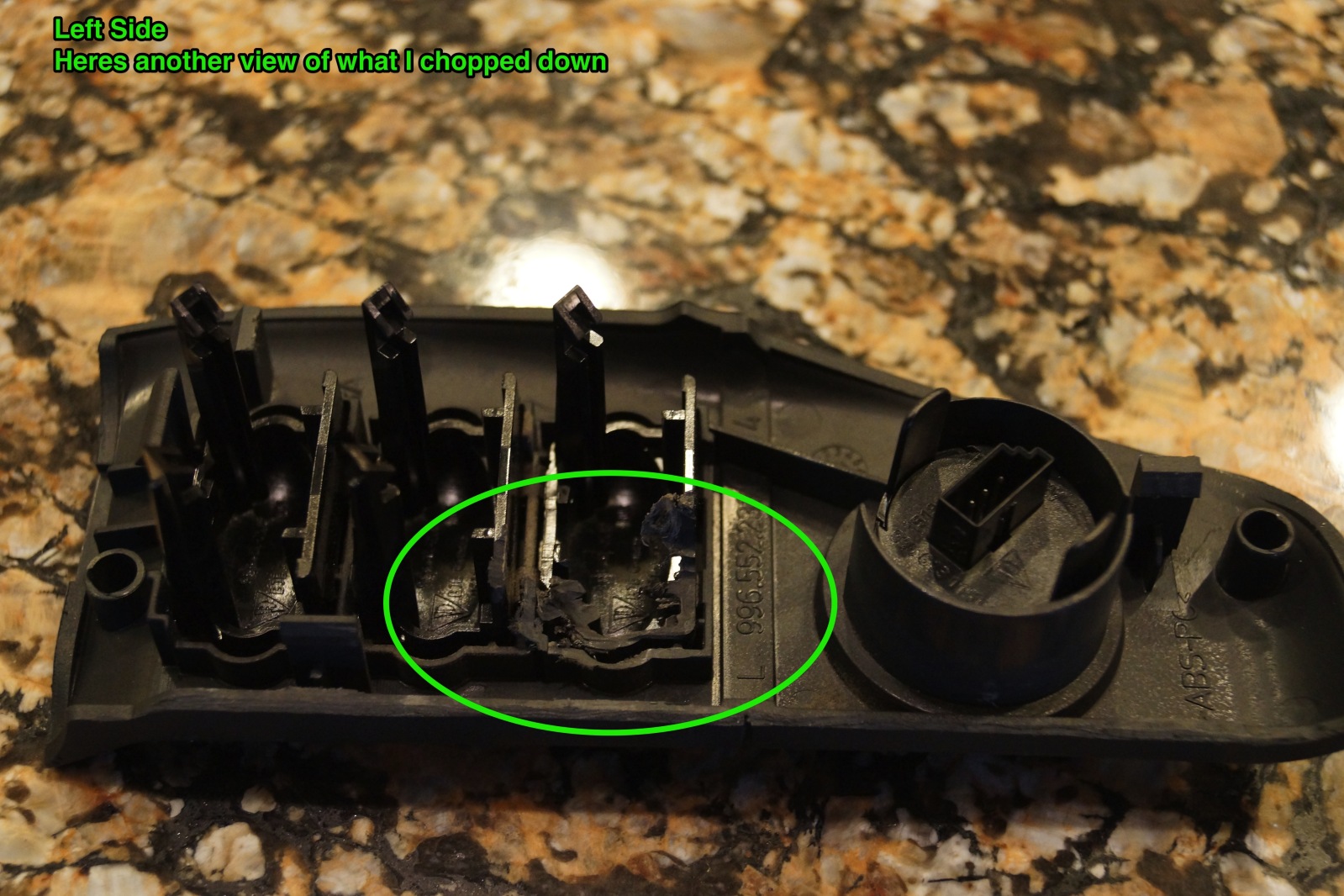
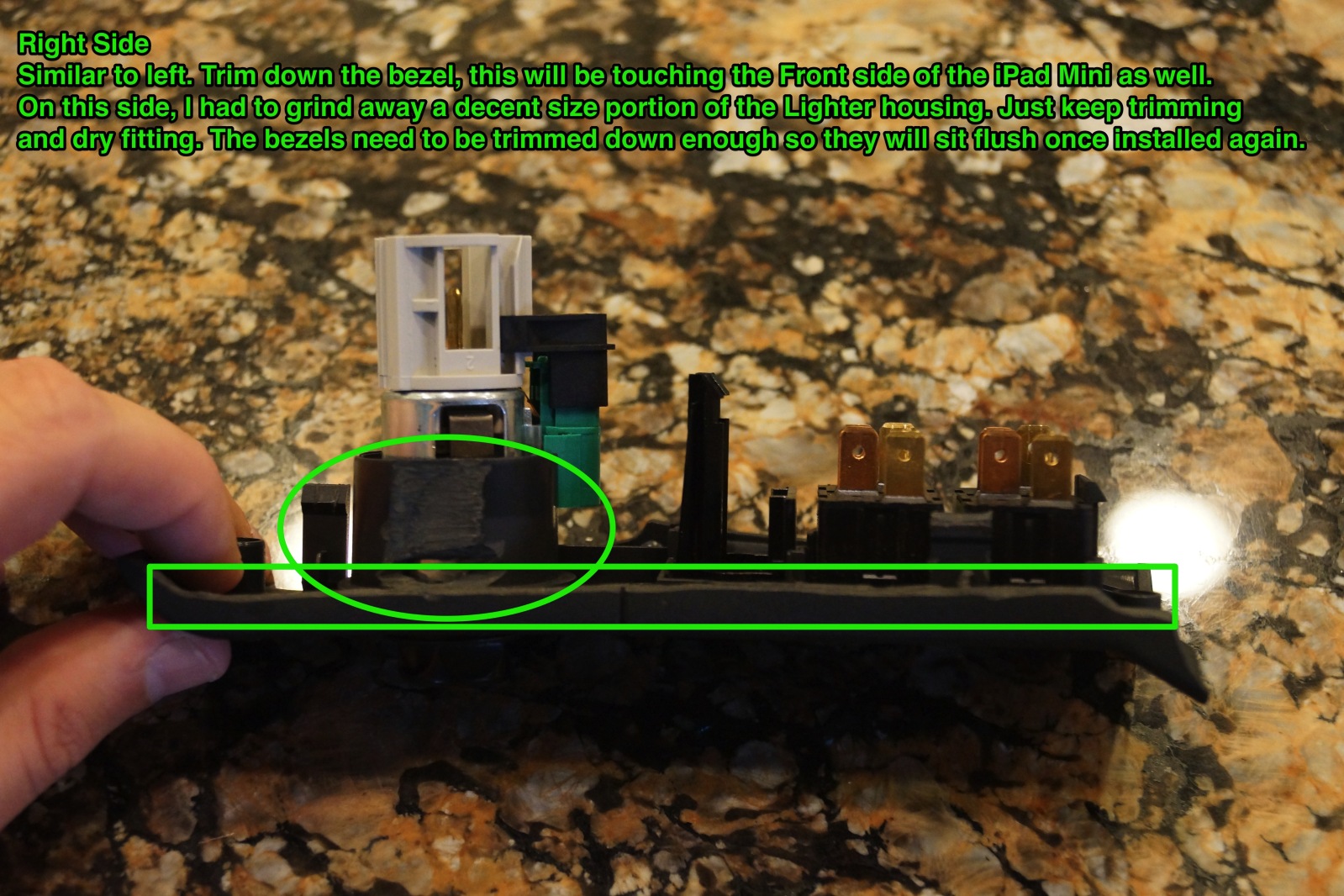
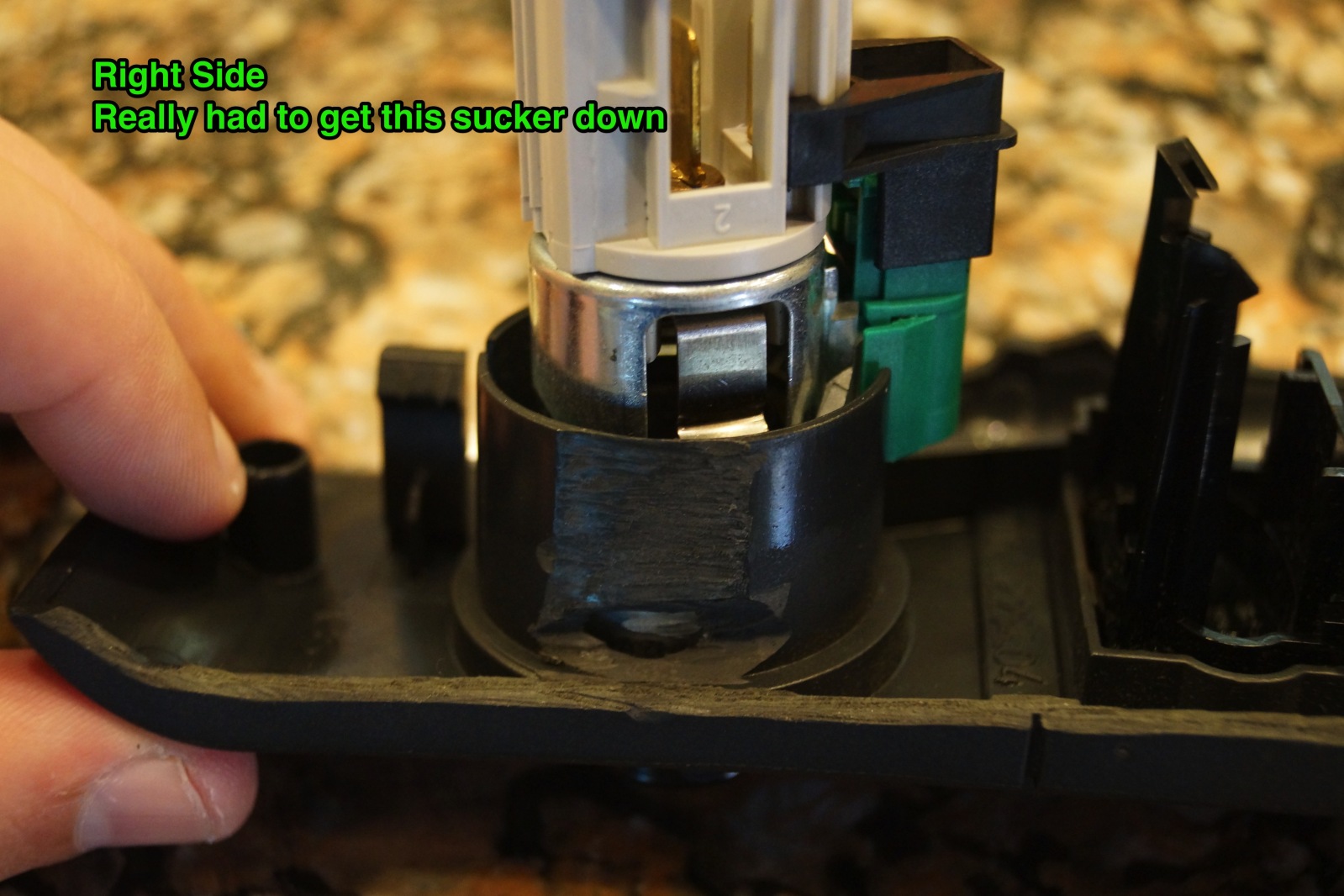
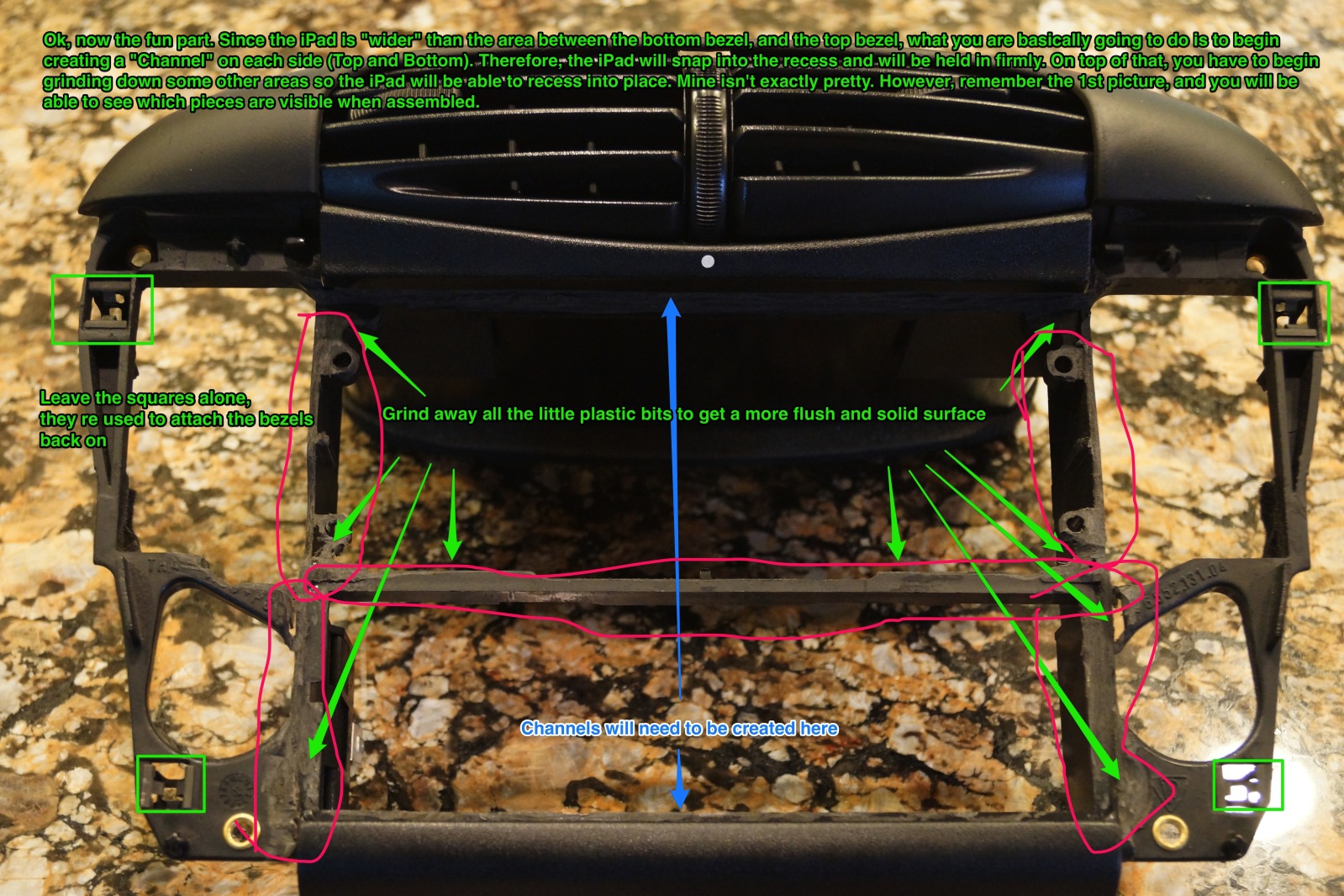
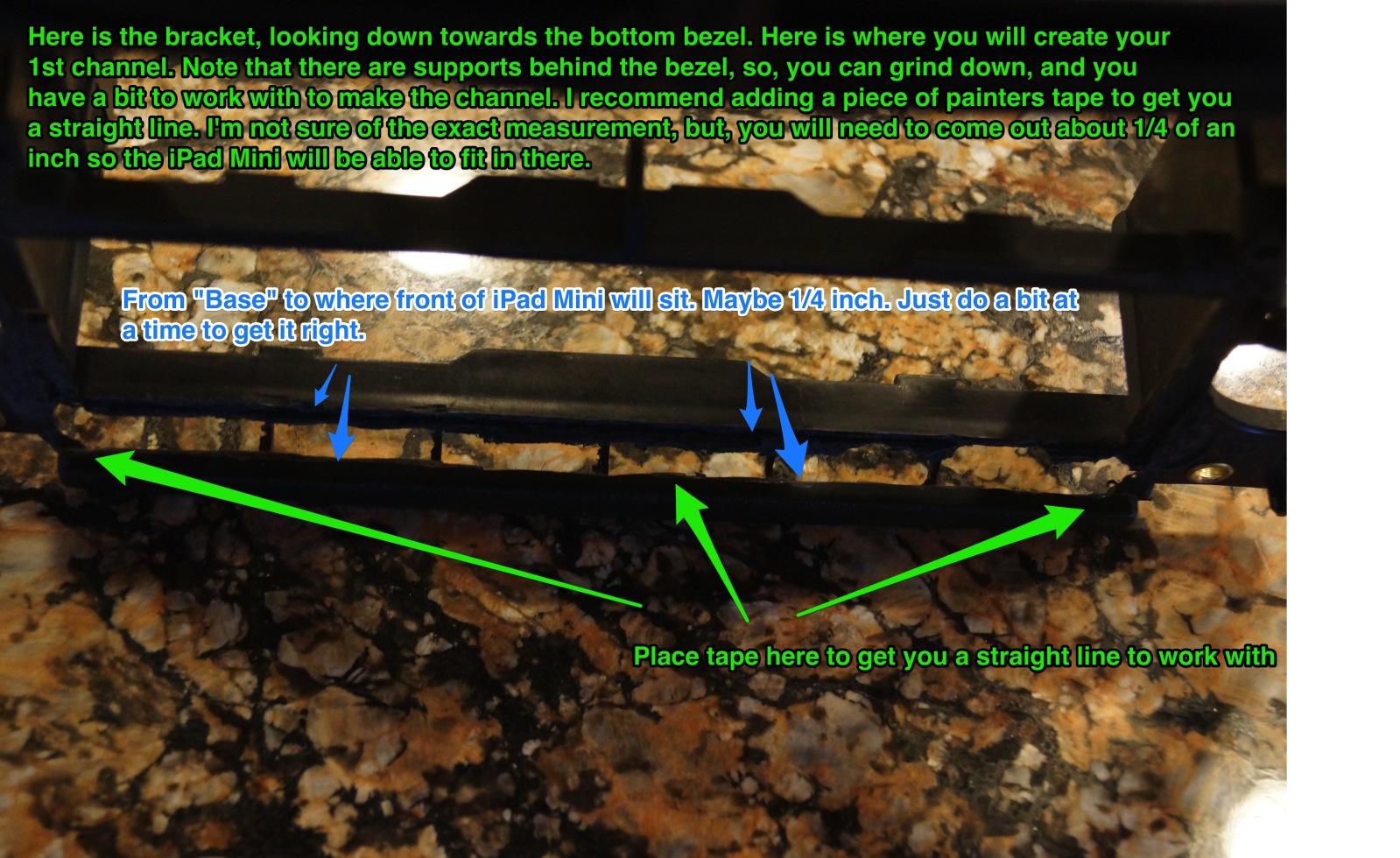
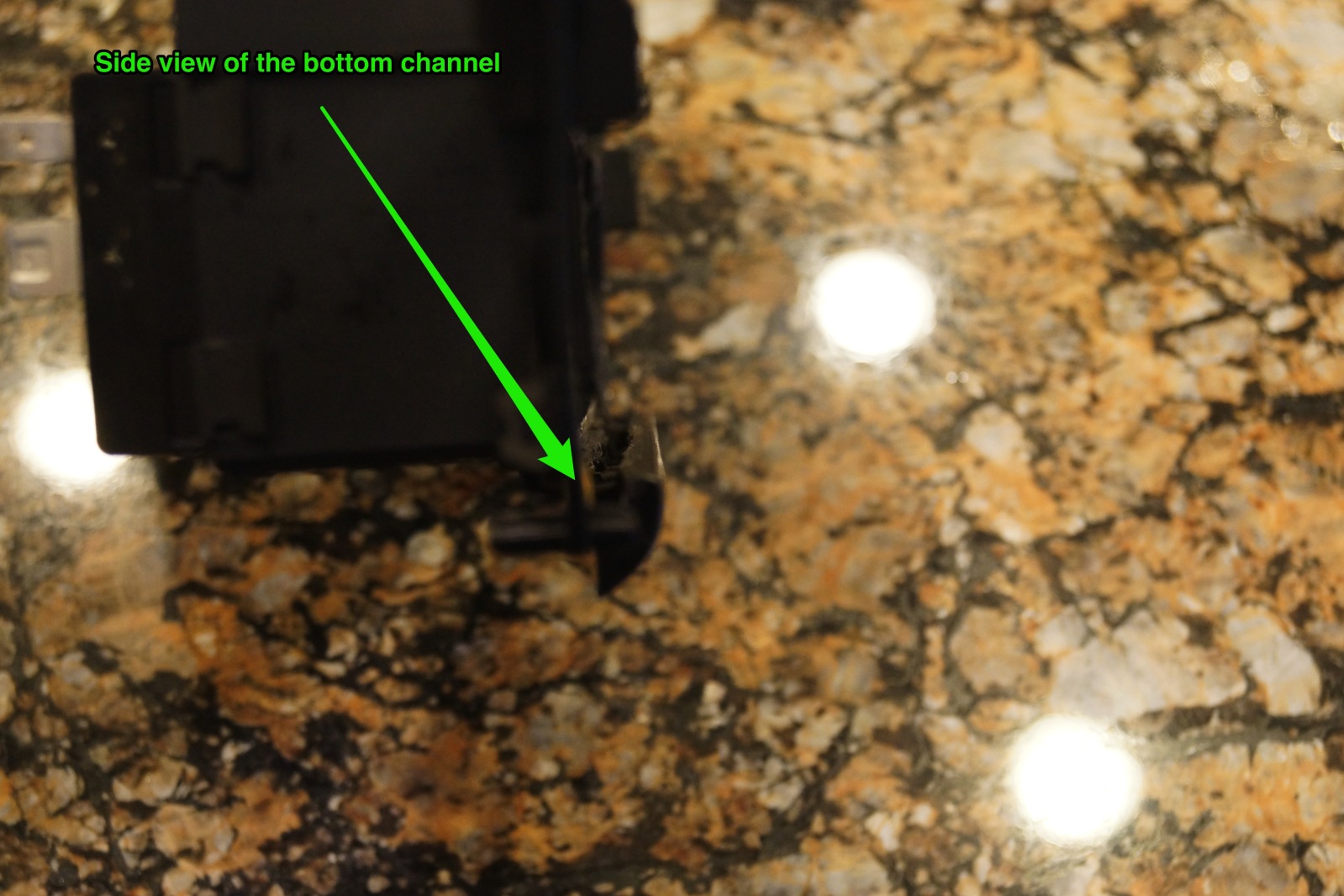
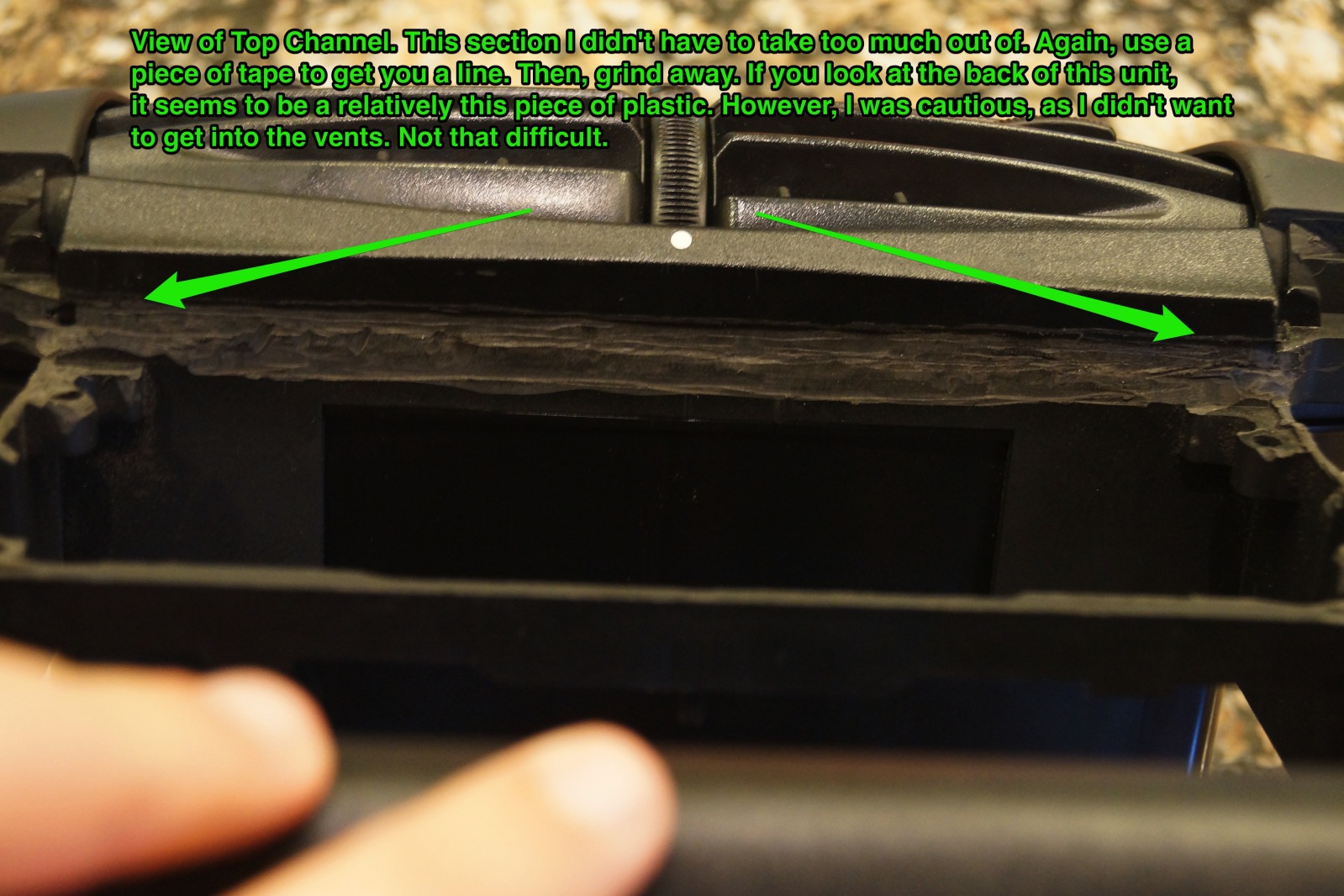
It's actually relatively easy. Just have a to be a bit creative. I'm going to work on mine to make it a little cleaner here the next few days. But, that's more OCD on my part, since it's hidden.
Biggest tip I have, is to use Painters Tape to get straight lines in the channels (outlined below).
Registered User
Joined: Aug 2013
Posts: 61
Rep Power: 15
As far as the top portion, 1. Camera Angle, 2. The top channel isn't as deep as the bottom, therefore, it's more resting on the top portion, than in the channel. Also, if you look head onto the iPad mini, the screen really doesn't go all the way across the top, since the frame stick out a bit more than the screen. So, it's resting on that frame.
Good question though. I think to clean it up even more, I should have made the top channel a little deeper (1mm), and the bottom channel less deep.
But in reality, it really looks pretty OEM when all is said in done.
Registered User
Joined: Aug 2013
Posts: 61
Rep Power: 15
Good luck! Take pics when your'e done!
I think I read somewhere, that there are dremel bits for plastic, that you can pick up at Lowes/Home Depot. I didn't have them, but, it may be worth looking into.
I think I read somewhere, that there are dremel bits for plastic, that you can pick up at Lowes/Home Depot. I didn't have them, but, it may be worth looking into.
Registered User
Joined: Sep 2009
Posts: 567
From: Houston - sort of
Rep Power: 59
Mspross, did you connect the factory speaker wires to the new stereo plug? I'm removing a full din radio (pioneer) to install the iPad. The new single din pioneer uses the same plug, but the total monster cable (stock was factory Nav) is just too much to fit down to the lower cubby. Could I simply connect everything but the speakers as I will use the pre outs?
Registered User
Joined: Aug 2013
Posts: 61
Rep Power: 15
Mspross, did you connect the factory speaker wires to the new stereo plug? I'm removing a full din radio (pioneer) to install the iPad. The new single din pioneer uses the same plug, but the total monster cable (stock was factory Nav) is just too much to fit down to the lower cubby. Could I simply connect everything but the speakers as I will use the pre outs?