


iPad Mini in-dash install [996 MkII]


Thread Starter
|
Registered User
Joined: Sep 2012
Posts: 282
Rep Power: 27

With Slacker, I need to change to the slacker screen on the iPad to select my stations, then back to waze...
The pandora setup is just a bit easier for casual driving when I want commercial free music and my map display up, most of the time.
I switch over to slacker for longer drives when I want to be more picky about the music I'm listening to.

Registered User
Joined: Jun 2013
Posts: 1
Rep Power: 0
I too have a Pioneer DEH-X9500BHS connected to my iPad mini, but it only gives a trickle charge. I usually have to charge it separately using a cigarette lighter charger.
Are you saying that you are able to charge your iPad mini using just the Pioneer DEH-X9500BHS ?
Are you saying that you are able to charge your iPad mini using just the Pioneer DEH-X9500BHS ?

Registered User
Joined: Jan 2013
Posts: 131
From: North Texas
Rep Power: 19
Four month check in from my original install...
The Pioneer unit functions quite well, and the ergonomics are good but not perfect. One issue I have is that while I can set the display color to a very close match to the Porsche lighting, it becomes pretty difficult to read at that particular color/intensity with my sunglasses on, so I've changed it to a blue/white anyway for legibility, offsetting one of the advantages of the Pioneer unit (color match).
The Pioneer unit functions quite well, and the ergonomics are good but not perfect. One issue I have is that while I can set the display color to a very close match to the Porsche lighting, it becomes pretty difficult to read at that particular color/intensity with my sunglasses on, so I've changed it to a blue/white anyway for legibility, offsetting one of the advantages of the Pioneer unit (color match).
Registered User
Joined: Jan 2013
Posts: 131
From: North Texas
Rep Power: 19
Rob, I see your awesome install. Are you able to use your cup holders still? Not that I want to but just for keeping it as stock as possible. I removed the trim and just used a strip of double sided tape to keep in place for now, but from what you install looks like you kept it functional. Did you have to trim the bottom of the mount?
Registered User
Joined: Jan 2013
Posts: 131
From: North Texas
Rep Power: 19
Sorry guys. I have to figure out how to multi quote (if you can on this forum).
Feedback for those debating ipad or a double din:
An Alpine 8" double din would be more user friendly while driving but the iPad mini route is about half the price. You are not going to be doing most of the "extra" things the iPad can do while driving. (Videos, internet, streaming DirecTV, etc.)
But I guess you can pull over and check you mail and the winning lotto numbers and your passenger will never get bored.
If you are not into tech or like to tinker and exploring a systems limits (half the fun is jailbreaking and exploring what can be done) then just drop in a commercial unit. With the iPad you have more control and maybe too many choices.
Feedback for those debating ipad or a double din:
An Alpine 8" double din would be more user friendly while driving but the iPad mini route is about half the price. You are not going to be doing most of the "extra" things the iPad can do while driving. (Videos, internet, streaming DirecTV, etc.)
But I guess you can pull over and check you mail and the winning lotto numbers and your passenger will never get bored.
If you are not into tech or like to tinker and exploring a systems limits (half the fun is jailbreaking and exploring what can be done) then just drop in a commercial unit. With the iPad you have more control and maybe too many choices.
Thread Starter
|
Registered User
Joined: Sep 2012
Posts: 282
Rep Power: 27
Once you have an internet connected car (I've had an iPad in my other vehicles for years, though just mounted on a RAM cradle), it's pretty hard to go back to some dumb unconnected double din dvd radio...
Last edited by pfbz; Jul 1, 2013 at 10:22 PM.

Registered User
Joined: Jan 2012
Posts: 358
From: Philippines
Rep Power: 29
This is really great work! Genius! This will probably be my next project. Just one question I didn't find in the write ups...How do you connect the iPad cable on the iPad itself? Are there no obstructions on the side and you just plug it in?
Registered User
Joined: Mar 2012
Posts: 155
From: Savannah
Rep Power: 23
You may need to dremel the horse shoe or switch place holders in order for the cord to fit. I have mine facing the left and have plenty of room.


Thread Starter
|
Registered User
Joined: Sep 2012
Posts: 282
Rep Power: 27
Exactly... Though I have my cord on the right, so either way works.
Thread Starter
|
Registered User
Joined: Sep 2012
Posts: 282
Rep Power: 27
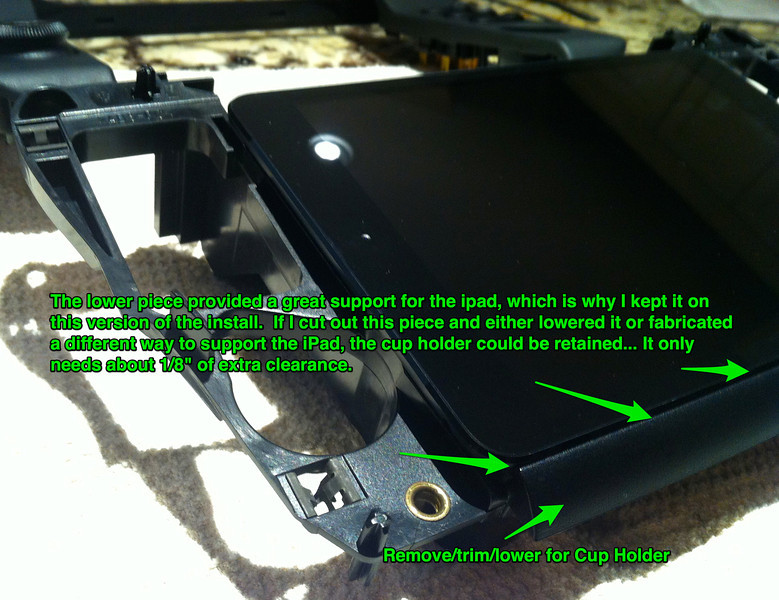
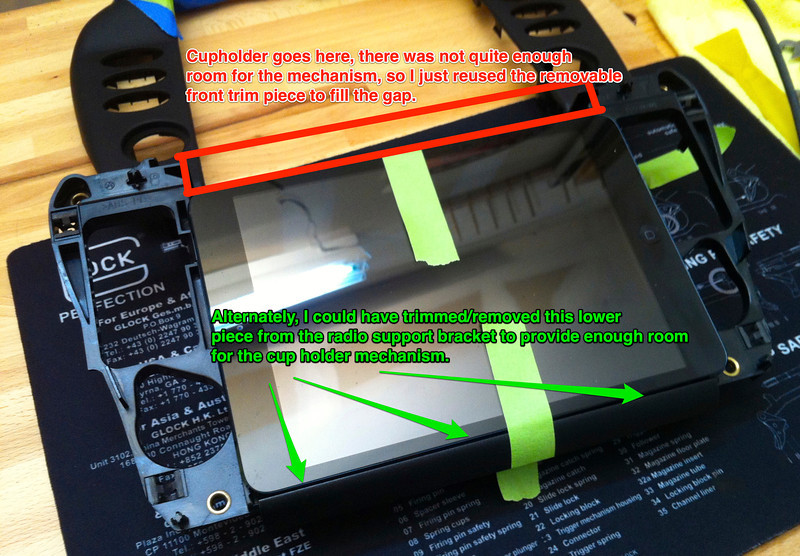
[QUOTE=32krazy!;3885718..what did you mod to be able to keep the cupholder functional? any pics of the cupholder mod?[/QUOTE]
These were my earlier notes...
The iPad is just a touch too tall without trimming the lower radio support as shown.
These were my earlier notes...
The iPad is just a touch too tall without trimming the lower radio support as shown.
Registered User
Joined: Mar 2012
Posts: 155
From: Savannah
Rep Power: 23
I removed about 1/8" or so from the area marked in green with a dremel. Best to tape a straight line then take your time with a cutoff wheel and you should be in business.